
Ziply Fiber Router Setup: Use Your Own Router with the ONT
To use your own router with Ziply Fiber, connect its WAN port directly to the Ethernet RJ45 jack on the Nokia or Calix Optical Network Terminal (ONT) using a Cat6a cable. Ziply ONTs function as transparent Layer-2 bridges by default without requiring modem bridge mode, but you must release the old router's DHCP lease first to prevent a 2-hour MAC lock.
- Zero Bridge Mode Required: Ziply ONTs (Nokia
XS-010X-QandG-010G-A) hand off native public IP traffic with no VLAN tags or PPPoE credentials. - The 2-Hour MAC Lock: Disconnecting an old router without releasing its WAN IP locks the ONT port to the old MAC address until the 7,200-second DHCP lease expires.
- Clean Handoff Protocol: Click Release DHCP in your old router's web GUI immediately before swapping cables, or power down the ONT for 2 hours.
- Multi-Gig Ready: Multi-gig Ziply plans (2 Gig, 5 Gig, 10 Gig) require connecting to the 10GBASE-T port on the Nokia ONT with an auto-negotiating 10GbE WAN router.
Ziply Fiber Hardware Architecture: ONT vs Rented Gateway
Unlike cable internet providers that supply integrated modem/router gateways, Ziply Fiber terminates its passive optical fiber drop into a dedicated Optical Network Terminal (ONT). In single-family residences, this is typically a wall-mounted Nokia G-010G-A (for Gigabit plans) or a Nokia XS-010X-Q XGS-PON terminal (for 2 Gbps to 10 Gbps multi-gigabit tiers). The ONT converts optical light pulses into standard IEEE 802.3 Ethernet.
Because the ONT handles optical modulation and authentication with Ziply's Optical Line Terminal (OLT) in hardware, it performs zero Network Address Translation (NAT) and runs no internal DHCP server. The Ethernet jack on the bottom of the ONT provides a direct Layer-2 bridge to Ziply's metropolitan routing core. Any standalone wireless router, mesh system, or firewall can be plugged directly into this port, completely eliminating the need to rent Ziply's $10–$12/month Wi-Fi router.
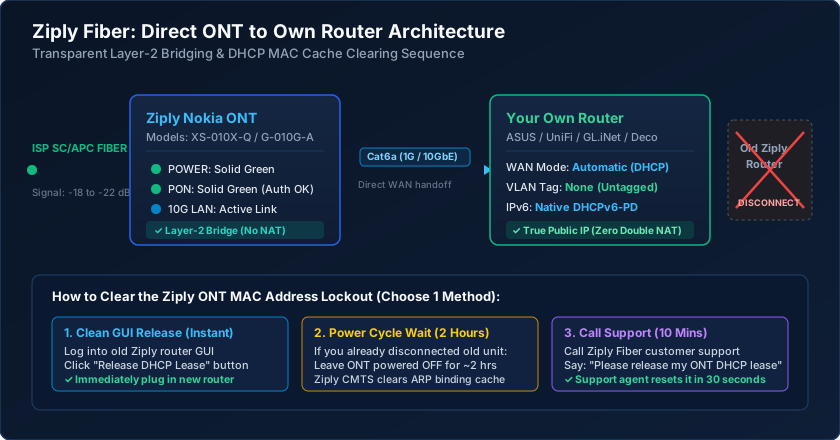
Before disconnecting any cables, you must inspect the LEDs on your Nokia ONT. A properly provisioned terminal will display a solid green POWER LED and a solid green PON (Passive Optical Network) LED. If the PON light is blinking green or red, the optical signal is out of specification (weaker than -27 dBm) or the serial number has not been registered in Ziply's provisioning database.
Fixing the Ziply ONT DHCP MAC Address Lease Lock
The single most common issue subscribers encounter when replacing a Ziply router is the dreaded 'connected but no internet' status on their new hardware. Ziply's Dynamic Host Configuration Protocol (DHCP) servers bind your assigned public IPv4 address to the Media Access Control (MAC) address of the first active router detected by the ONT. This lease carries a default expiration window of two hours (7,200 seconds).
If you unplug the factory-supplied Ziply router and immediately connect an ASUS, UniFi, or eero router, the Ziply gateway will silently drop all DHCP Discover packets from the new MAC address until the previous two-hour lease timer elapses. You have three ways to bypass or clear this restriction:
- Method A (Instant — Recommended): Log into your current Ziply router management interface at
192.168.1.1or192.168.254.254. Navigate toAdvanced > Status > WAN Connectionand click Release DHCP Lease. Once the WAN IP displays0.0.0.0, immediately disconnect the Ethernet cable and plug in your new router. - Method B (Passive Wait): Disconnect the old router, unplug the power adapter from the Nokia ONT, and leave both units powered off for 120 minutes. Ziply's broadband remote access server (BRAS) will age out the stale ARP cache entry.
- Method C (Support Clear): Call Ziply Technical Support at 1-866-699-4759 and say: "I installed my own router and need an automated DHCP lease release on my ONT port." Tier-1 support agents can clear the binding in under 30 seconds.
Configuring Your Third-Party Router WAN Settings
Ziply Fiber operates one of the most open and RFC-compliant fiber networks in North America. Unlike CenturyLink or Quantum Fiber (which mandate PPPoE credentials and IEEE 802.1Q VLAN 201 encapsulation), modern Ziply Fiber requires zero VLAN tags and zero authentication credentials on residential connections.
When walking through your new router's Quick Internet Setup wizard, apply these vendor-neutral WAN specifications:
- WAN Connection Type: Select
Automatic IP (DHCP / Dynamic IP). Do not select PPPoE, L2TP, or Static IP unless you pay for a dedicated business static IP block. - 802.1Q VLAN Tagging: Keep
DisabledorUntagged (VLAN 0/None). If your router interface requires an explicit VLAN menu, leave it untagged on the primary WAN interface. - WAN MTU: Set to
1500. Because Ziply uses native IPoE rather than PPPoE encapsulation, you enjoy the full 1500-byte standard Ethernet Maximum Transmission Unit without fragmentation overhead. - IPv6 Configuration: Enable IPv6 and choose
Native DHCPv6 with Prefix Delegation (DHCPv6-PD). Ziply dynamically delegates a/56IPv6 prefix, allowing your router to provision up to 256 independent internal/64subnets for guest networks and VLANs.
Multi-Gigabit Cabling: 2 Gig, 5 Gig and 10 Gig Upgrades
If you subscribe to Ziply Fiber's multi-gigabit service tiers (2000 Mbps, 5000 Mbps, or 10000 Mbps), physical cabling and port auto-negotiation become critical performance factors. The Nokia XS-010X-Q ONT features a single multi-rate 10GBASE-T RJ45 copper Ethernet port that supports 1 Gbps, 2.5 Gbps, 5 Gbps, and 10 Gbps speeds via IEEE 802.3bz / 802.3an auto-negotiation.
To realize full throughput without CRC packet errors, you must connect the ONT to your router using pure solid bare copper Category 6 (Cat6) for runs under 55 meters (180 ft), or Category 6a (Cat6a) for runs up to 100 meters (328 ft). Never use copper-clad aluminum (CCA) patch cords, as their high DC resistance causes link flapping and drops multi-gigabit links down to 100 Mbps or 1 Gbps.
Ensure your third-party router or firewall features a dedicated 2.5GbE or 10GbE WAN port (such as the ASUS RT-AX86U Pro, GL.iNet Flint 2, Ubiquiti UniFi Cloud Gateway Max, or a custom OPNsense mini-PC with Intel I226-V NICs). Connecting a multi-gig ONT to a traditional 1 Gbps WAN router limits your entire home to 940 Mbps due to physical port saturation.
Ziply Fiber ONT Hardware Specifications & Diagnostics
| ONT Model | Fiber Technology | Max WAN Ethernet Port | VLAN Tag Requirement | Recommended Cable |
|---|---|---|---|---|
| Nokia XS-010X-Q | XGS-PON (10G Symmetric) | 1x 10GBASE-T (10 Gbps RJ45) | Untagged (VLAN 0 / None) | Cat6a Shielded (500 MHz) |
| Nokia G-010G-A | GPON (2.5G / 1.25G) | 1x 1000BASE-T (1 Gbps RJ45) | Untagged (VLAN 0 / None) | Cat6 Solid Copper (250 MHz) |
| Calix GigaPoint 803G | GPON (Legacy Frontier/Verizon) | 1x 1000BASE-T (1 Gbps RJ45) | Untagged (VLAN 0 / None) | Cat5e or Cat6 Copper |
| Calix 716GE-I Indoor | BPON/GPON (Legacy Areas) | 1x 1000BASE-T RJ45 | Untagged (VLAN 0 / None) | Cat5e Bare Copper |
Ziply Router Replacement Pre-Flight Checklist
- Log into your existing Ziply router GUI at 192.168.1.1 and execute a WAN DHCP Release before unplugging.
- Inspect the Nokia ONT to confirm the PON and POWER status LEDs remain solid steady green.
- Run a high-quality Cat6 or Cat6a patch cable from the ONT 10G LAN port directly to your router WAN port.
- Configure your new router WAN connection to Automatic IP (DHCP) with zero VLAN ID tags.
- Enable Native IPv6 with DHCPv6 Prefix Delegation (/56) to receive global IPv6 addresses.
- Run a wired local speed test to verify your connection reaches full provisioned upload and download bandwidth.
Frequently Asked Questions
Do I have to call Ziply to use my own router?
No, you do not need to call Ziply in advance if you perform a DHCP release on your old router before disconnecting it. The Nokia ONT acts as an unmanaged Layer-2 bridge and automatically assigns a public IP to any new router with an active DHCP lease.
Why does my new router have an orange WAN light on Ziply?
An orange WAN light indicates your router is not receiving an IP address from Ziply. This is caused by the 2-hour MAC lock holding onto your old router's lease. Leave the ONT powered off for 2 hours, or call Ziply tech support to release the lease on their end.
Does Ziply Fiber charge an equipment rental fee if I use my own router?
No. Ziply Fiber does not charge router rental fees when you supply your own router. If you return their leased router to a local Ziply retail location or via a prepaid UPS shipping label, the monthly rental fee will be removed from your bill.
Does Ziply Fiber use PPPoE or require a username and password?
No. Modern Ziply Fiber residential accounts use pure Dynamic DHCP (IPoE). Unlike legacy Frontier or CenturyLink DSL connections, you never need to enter a PPPoE username or password into your router.
Related Router Setup & Engineering Guides
- How to Use Your Own Router with Google Fiber (1G, 2G & 5G Plans) — Connect your own router directly to the Google Fiber Jack (ONT) on 1G, 2G, 5G, and 8G plans, or put the GFEX310 Wi-Fi 6E router into Bridge Mode online.
- Fiber ONT Lights Meaning: Red Optical/LOS & Blinking PON Fix — Decode Nokia, Calix, and Adtran Fiber ONT status LEDs. Fix solid red Optical/LOS alarms, blinking green PON registration failures, and Ethernet link drops.
- How to Set Up a Router — Set up a home or small office router from scratch: connect WAN/ONT cables, release ISP DHCP leases, configure WPA2/WPA3 WiFi, and harden admin access.
- DNS Settings on a Router — Configure router DNS settings using Cloudflare 1.1.1.1, Quad9 9.9.9.9, or Google 8.8.8.8. Understand WAN vs DHCP LAN DNS, DoH/DoT encryption, and DNS leaks.