
NVR Storage Calculation Guide: 4K Camera Bitrate & Terabytes
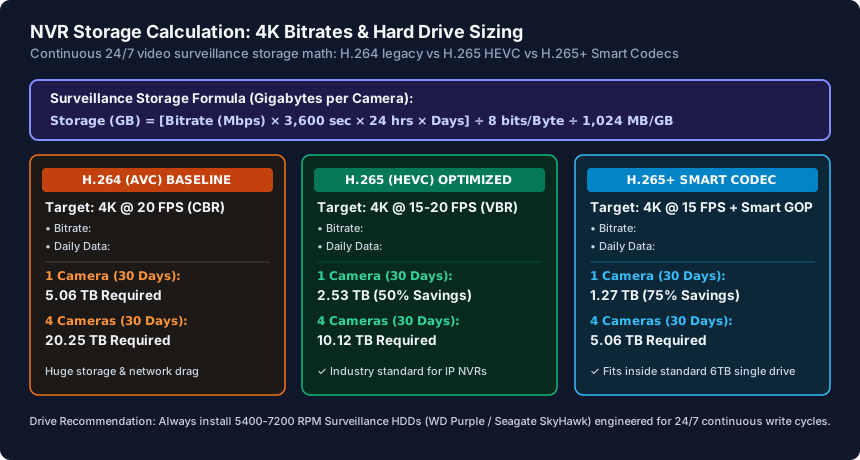
To calculate surveillance storage requirements for your Network Video Recorder (NVR), use the formula: Storage in GB = (Bitrate in Mbps × 3,600 × 24 × Days) ÷ 8 ÷ 1,024. A 4K camera streaming continuous H.265 video at 8 Mbps generates 84.4 GB per day (2.53 TB for 30 days), whereas legacy H.264 encoding requires over 5.06 TB per camera for the same 30-day retention.
- Codec Efficiency: H.265 (HEVC) cuts video storage requirements and network streaming bandwidth by exactly 50% compared to legacy H.264 (AVC) at identical visual fidelity.
- Frame Rate Optimization: Dropping camera frame rates from 30 FPS to 15 FPS reduces total hard drive storage consumption by 35% to 45% without compromising motion tracking or facial recognition.
- Smart Codecs & Smart GOP: Enabling proprietary dynamic codecs (Hikvision H.265+, Dahua Smart H.265+, or UniFi AI compression) reduces static background bitrate to 4 Mbps for 4K video.
- Drive Selection Matters: Standard desktop hard drives fail within 12–18 months under continuous video writing; always deploy 24/7 surveillance-rated drives (WD Purple or Seagate SkyHawk).
The Video Storage Formula: Breaking Down Megabits to Terabytes
When designing a home or business IP camera surveillance system, hard drive capacity is frequently miscalculated. Under-sizing your storage pool results in the NVR overwriting critical security footage after just a few days, while over-sizing wastes hundreds of dollars on unneeded mechanical drives.
Surveillance calculations require converting camera streaming bitrates (measured in Megabits per second, or Mbps) into raw hard drive storage capacity (measured in Gigabytes, GB, or Terabytes, TB). The mathematical formula is:
Daily Storage (GB) = [Bitrate (Mbps) × 3,600 seconds/hour × 24 hours/day] ÷ 8 bits per Byte ÷ 1,024 MB per GB

30-Day Storage Pool (TB) = [Daily Storage (GB) × 30 Days × Number of Cameras] ÷ 1,024 GB per TB
For example, if you deploy four 4K (8 Megapixel) IP cameras streaming at a conservative H.265 bitrate of 8 Mbps with continuous 24/7 recording, each camera generates (8 × 3600 × 24) / 8 / 1024 = 84.375 GB per day. Over a standard 30-day retention window, four cameras consume 84.375 × 30 × 4 = 10,125 GB—requiring a minimum formatted capacity of 10.12 TB (which necessitates at least a 12 TB or dual 8 TB drive array).
H.264 vs H.265 vs H.265+: Codec Efficiency and Bandwidth Demands
The single most impactful variable in camera storage calculation is the video compression codec configured on your IP cameras:
- H.264 (AVC - Advanced Video Coding): Developed in 2003, H.264 divides video frames into 16x16 pixel macroblocks. To render clear 4K resolution (3840x2160) at 20 FPS without severe pixelation or compression artifacts, H.264 demands a continuous bitrate of 14 Mbps to 16 Mbps. A single 4K camera on H.264 consumes over 5 TB of hard drive space per month.
- H.265 (HEVC - High Efficiency Video Coding): Approved in 2013, H.265 uses Coding Tree Units (CTUs) that scale up to 64x64 pixels. It dynamically compresses large uniform areas (such as walls, lawns, driveways, and night skies) far more efficiently than H.264. H.265 delivers identical perceptual sharpness at half the bitrate (7 Mbps to 8 Mbps for 4K), instantly doubling your footage retention period.
- H.265+ / Smart Codecs (Dynamic GOP & Background Modeling): Modern enterprise cameras implement proprietary extensions (such as H.265+, Smart H.265, or Zipstream). These algorithms generate reference background models and lengthen the Group of Pictures (GOP) interval during quiet hours. When no motion is occurring, the camera drops its bitrate to 1 Mbps to 2 Mbps, spiking to 8 Mbps only when humans or vehicles traverse the frame. This reduces 24/7 storage consumption by up to 75% compared to baseline H.264.
Frame Rate Realities: Why 15 FPS is the Surveillance Industry Sweet Spot
A common beginner mistake when configuring security cameras is setting all streams to the maximum hardware limit of 30 frames per second (FPS). While 60 FPS and 30 FPS are standard for Hollywood movies and console gaming, surveillance video is completely different.
In forensic security investigations, investigators do not require cinematic motion blur; they require crisp, sharp still frames capable of capturing license plates, facial contours, clothing patterns, and tattoos. Running cameras at 30 FPS introduces three significant technical liabilities:
- Extreme Hard Drive Bloat: 30 FPS produces twice as many frames as 15 FPS, increasing file sizes by 35% to 45% (compression algorithms mitigate pure linear doubling, but the storage penalty remains massive).
- Degraded Low-Light Night Vision: To capture 30 frames every second, the camera sensor's physical shutter speed must remain shorter than 1/30th of a second. This limits photon intake, resulting in darker, grainier night vision. At 15 FPS, the shutter can open longer (1/15th of a second), capturing significantly more ambient light with lower digital sensor noise.
- NVR Decoding Bottlenecks: When an NVR or client PC attempts to display a 16-channel split screen in real time, decoding sixteen 30 FPS 4K streams simultaneously can cause client CPU exhaustion, frame drops, and live-view stutter.
Virtually all enterprise security guidelines recommend configuring outdoor surveillance cameras to 15 FPS (or 20 FPS for high-speed roadways). This single adjustment instantly frees up terabytes of storage pool capacity.
Hard Drive Selection: Surveillance (WD Purple/SkyHawk) vs Desktop Drives
Never install standard consumer desktop hard drives (such as Western Digital Blue or Seagate BarraCuda) inside an NVR. Desktop hard drives are engineered for an operational profile of 80% read / 20% write, assuming 8 hours of usage per day with frequent sleep cycles.
An NVR subjects hard drives to an inverse, punishing workload: 95% continuous sequential write / 5% read, running 24 hours a day, 365 days a year, often in poorly ventilated equipment closets subject to heat and mechanical vibration.
Specialized surveillance drives—specifically Western Digital Purple and Seagate SkyHawk—incorporate specialized hardware features engineered specifically for CCTV streams:
- AllFrame / ImagePerfect Firmware: Standard drives pause write operations to perform rigorous error recovery checks when encountering bad sectors. In an NVR, pausing a write operation causes incoming video packets to drop, resulting in permanent video pixelation or missing time gaps. Surveillance firmware drops error recovery in favor of streaming continuity, guaranteeing zero dropped frames.
- Rotational Vibration (RV) Sensors: In multi-bay NVRs (4 to 16 bays), multiple mechanical spindles spinning at 5,400 to 7,200 RPM induce mechanical harmonics. Surveillance drives feature internal accelerometers that dynamically adjust read/write head actuators to prevent head misalignments.
- Workload Ratings: Surveillance drives are rated for 180 TB/year workload limits (and up to 550 TB/year for enterprise Purple Pro / SkyHawk AI drives), compared to just 55 TB/year for standard desktop drives.
30-Day NVR Hard Drive Capacity Sizing Table (24/7 Continuous Recording)
| Camera Setup | H.264 Bitrate (30 FPS) | H.264 Storage (30 Days) | H.265 Bitrate (15 FPS) | H.265 Storage (30 Days) |
|---|---|---|---|---|
| 1x 1080p (2 MP) Camera | 4.0 Mbps | 1.27 TB Required | 1.5 Mbps | 0.48 TB Required |
| 4x 1080p (2 MP) Cameras | 16.0 Mbps | 5.06 TB Required | 6.0 Mbps | 1.90 TB Required |
| 1x 2K / 4 MP Camera | 8.0 Mbps | 2.53 TB Required | 3.5 Mbps | 1.11 TB Required |
| 4x 2K / 4 MP Cameras | 32.0 Mbps | 10.12 TB Required | 14.0 Mbps | 4.43 TB Required |
| 1x 4K / 8 MP Camera | 16.0 Mbps | 5.06 TB Required | 7.0 Mbps | 2.22 TB Required |
| 4x 4K / 8 MP Cameras | 64.0 Mbps | 20.25 TB Required | 28.0 Mbps | 8.86 TB Required |
| 8x 4K / 8 MP Cameras | 128.0 Mbps | 40.50 TB Required | 56.0 Mbps | 17.72 TB Required |
| 16x 4K / 8 MP Cameras | 256.0 Mbps | 81.00 TB Required | 112.0 Mbps | 35.44 TB Required |
NVR Storage Optimization Checklist
- Verify all IP cameras are set to H.265 or H.265+ rather than legacy H.264 in video encoder settings.
- Cap camera frame rates at 15 FPS to reduce storage consumption by up to 40% with zero loss in visual tracking quality.
- Configure Variable Bitrate (VBR) with medium-to-high quality instead of Constant Bitrate (CBR) to save space during static scenes.
- Set motion detection or smart AI event tagging to record high-bitrate video only during activity while keeping a low-bitrate baseline.
- Select surveillance-certified hard drives (WD Purple or Seagate SkyHawk) with at least 180 TB/year endurance ratings.
- Add 20% storage overhead to your calculated target to account for filesystem formatting tables and snapshot buffers.
Frequently Asked Questions
Should I choose Variable Bitrate (VBR) or Constant Bitrate (CBR) on my NVR?
For 95% of deployments, Variable Bitrate (VBR) is recommended. VBR automatically throttles bitrate down when scenes are static (such as a driveway or hallway at night) and increases bitrate only when motion occurs, saving 30% to 50% hard drive space compared to CBR.
Can I use solid-state drives (SSDs) in an NVR instead of mechanical hard drives?
While SATA or NVMe SSDs work in an NVR, they are generally not recommended for continuous 24/7 video storage. SSDs cost 4 to 6 times more per terabyte than surveillance HDDs, and continuous multi-stream video writing exhausts flash memory write endurance (TBW) rapidly without delivering perceptible performance benefits for sequential surveillance writes.
How does motion-only recording compare to 24/7 continuous recording?
Motion-only recording dramatically cuts storage requirements by 70% to 90%, but carries the risk of missing crucial context (such as events right before a motion trigger trips). Modern AI NVRs solve this by recording 24/7 at a low-resolution sub-stream (e.g., 720p at 512 Kbps) and recording the full 4K main-stream only when AI human/vehicle motion is detected.
Why does my 8 TB hard drive only show 7.27 TB of usable space in the NVR?
Hard drive manufacturers calculate capacity in decimal gigabytes (1 TB = 1,000,000,000,000 bytes), whereas NVR operating systems calculate storage in binary tebibytes (1 TiB = 1,099,511,627,776 bytes). Dividing decimal capacity by 1.0995 yields approximately 7.27 TiB of usable formatted space.
Related Home Security Devices & Engineering Guides
- NVR Security Camera Network Basics (PoE, VLAN & RTSP) — Architect a secure PoE NVR camera network. Compare dual-NIC NVRs against VLAN switches, block cloud P2P callbacks, and view RTSP feeds over WireGuard VPN.
- Home Security Camera Network Setup (Wired PoE vs WiFi) — Plan a reliable home security camera network. Calculate 4K H.265 bitrates, verify -65 dBm WiFi RSSI, install outdoor PoE surge arrestors, and bind static IPs.
- Smart Doorbell WiFi Setup: Fixing Weak Signal & Chimes — Fix smart video doorbell WiFi dropouts and chime reboots. Overcome brick wall attenuation, verify 16-24V AC transformer power, and lock to a 2.4GHz SSID.
- PoE Splitters & Extenders Guide: Power Non-PoE Gear — Power non-PoE smart hubs, Raspberry Pis, and USB-C devices from your PoE switch. Learn how PoE splitters work, voltage choices, and extender limits.