
Mesh WiFi vs Dedicated Access Points: Real-World Performance Guide
Choosing between a wireless Mesh Wi-Fi system and dedicated hardwired PoE Access Points (APs) comes down to physical cabling feasibility versus uncompromised multi-gigabit throughput. While wireless mesh units provide simple plug-and-play coverage using wall outlets, each wireless backhaul hop suffers a 50% throughput penalty and variable latency jitter. In contrast, ceiling-mounted PoE access points deliver full wire-speed performance, sub-2ms latency, and enterprise 802.11k/v/r roaming.
- The Half-Duplex Wireless Penalty: Dual-band mesh satellites must transmit and receive over the exact same radio channel, cutting available internet bandwidth in half (50% loss) on the first hop and up to 75% on the second hop.
- Tri-Band & 6 GHz Mitigate Mesh Loss: Premium Wi-Fi 6E and Wi-Fi 7 mesh systems (such as eero Max 7 or Deco BE85) dedicate a separate high-frequency 6 GHz radio exclusively for wireless backhaul, preserving line-rate speeds if nodes are within 30 feet.
- PoE Access Points Deliver Deterministic Speed: Hardwired access points (UniFi, Omada) connect via Cat6/6a copper back to a PoE switch, eliminating airtime congestion and sustaining full 1GbE/2.5GbE speeds across all access points simultaneously.
- Installation & Cost Trade-Off: Mesh systems require zero wall drilling and take 10 minutes to deploy via smartphone apps; enterprise APs require running Ethernet through attics/crawlspaces and configuring a centralized network controller.
Architectural Breakdown: Wireless Mesh vs Structured Access Points
Both Mesh Wi-Fi systems and structured Access Point networks solve the same fundamental problem: a single central wireless router cannot penetrate multiple floors, brick walls, and low-E glass without dead zones.
However, the underlying transmission architecture between the two systems is fundamentally different.
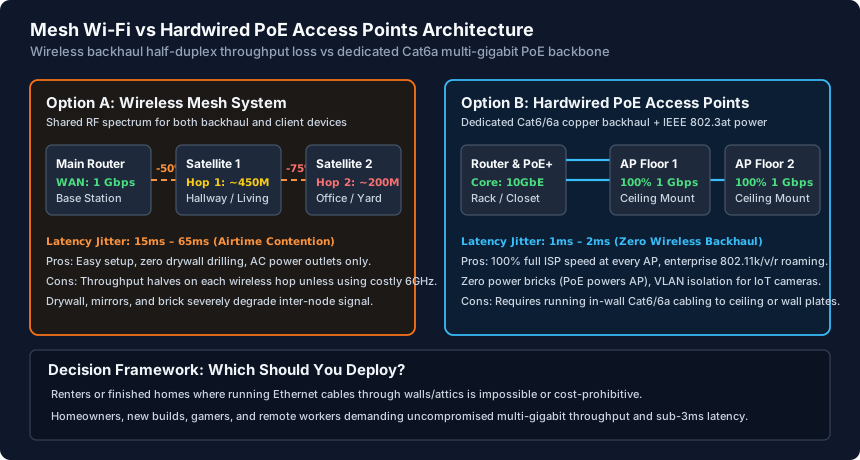
The Wireless Backhaul Problem: Why Mesh Speeds Drop Across Hops
Wi-Fi is a half-duplex medium: a wireless radio can either transmit data or receive data at any given millisecond, but it cannot do both simultaneously. When client devices connect to a dual-band wireless mesh satellite node:
- The satellite receives a data packet from your laptop over the 5 GHz radio channel.
- The satellite must store that packet in its memory buffer.
- The satellite then turns around and retransmits that same packet over the exact same 5 GHz radio channel back to the main base station router.
Because the airtime is consumed twice for a single data transfer, your maximum achievable throughput drops by approximately 50% on the first satellite hop. If you daisy-chain a second satellite further into the house, throughput drops by 75%. Furthermore, physical obstructions like metal lath, tile bathrooms, and HVAC ductwork introduce packet retransmissions, leading to latency spikes and gaming lag.
Why Hardwired PoE Access Points (APs) Are the Superior Enterprise Solution
Dedicated Access Points (such as Ubiquiti UniFi U7 Pro, TP-Link Omada EAP773, or Aruba Instant On AP25) operate on an entirely different networking model:
- Full Duplex Dedicated Copper Backhaul: Every AP is physically connected to a central managed switch via Cat6 or Cat6a cabling. The 1 Gbps or 2.5 Gbps Ethernet link operates in full duplex, freeing 100% of the access point's wireless radios exclusively for communicating with your smartphones, laptops, and TV streaming devices.
- Power over Ethernet (PoE / PoE+): Access points require no ugly power bricks or proximity to wall AC outlets. A single Cat6 cable plugged into a PoE switch delivers both multi-gigabit data and low-voltage DC power (IEEE 802.3af/at). This allows APs to be cleanly mounted to ceilings in the center of rooms for optimal 360-degree RF radiation.
- Advanced VLAN Segmentation: Dedicated APs support multiple SSIDs mapped to independent 802.1Q VLANs. You can broadcast a primary Home Wi-Fi network, an isolated IoT Wi-Fi network for smart plugs and security cameras, and a throttled Guest network with captive portal rules.
Decision Framework: Which System Fits Your Home and Budget?
To choose the right Wi-Fi deployment for your home or business, evaluate these four criteria:
- Deploy Mesh Wi-Fi If: You are renting an apartment, living in a finished multi-story home where running Ethernet cables through drywall/attic is structurally impossible, or you prioritize a 10-minute automated setup managed entirely from an iPhone/Android app. (Tip: choose a Tri-Band Wi-Fi 6E or Wi-Fi 7 mesh system with a dedicated 6 GHz backhaul to minimize throughput loss).
- Deploy Hardwired PoE Access Points If: You are building or renovating a home with open drywall, demand uncompromised gigabit speeds in every room, host a homelab or NAS, require VLAN isolation for untrusted smart home gear, or play competitive online games where a 1ms to 2ms stable ping is mandatory.
- The Hybrid 'Ethernet Backhaul Mesh' Alternative: If you already own a mesh system (like eero, Orbi, or Deco) and have in-wall Ethernet jacks (or MoCA 2.5 coax adapters), connect an Ethernet cable between the satellite nodes and the main router. This transforms the mesh nodes into hardwired access points, bypassing the wireless airtime penalty entirely.
Mesh Wi-Fi vs Dedicated PoE Access Points Comparison Matrix
| Feature / Metric | Dual-Band Mesh | Tri-Band / Wi-Fi 7 Mesh | Hardwired PoE Access Points |
|---|---|---|---|
| Backhaul Medium | Shared 5 GHz wireless | Dedicated 6 GHz wireless | Cat6 / Cat6a solid copper (Full Duplex) |
| Throughput Retention | ~50% drop per hop | 85% – 95% line rate | 100% full wire speed (1G / 2.5G / 10G) |
| Latency & Jitter | 15ms – 65ms (Variable) | 8ms – 25ms (Moderate) | 1ms – 2ms (Rock-solid deterministic) |
| Power Source | Wall AC power adapter | Wall AC power adapter | Power over Ethernet (PoE 802.3af/at/bt) |
| Physical Placement | Desks, shelves, tables | Desks, shelves, tables | Ceiling or high wall mounts for optimal RF |
| VLAN Segmentation | Rare (Guest network only) | Rare (Guest network only) | Enterprise 802.1Q multi-SSID VLAN mapping |
| Installation Effort | 10 minutes (Plug & Play) | 15 minutes (App setup) | Requires pulling in-wall Ethernet cables |
| Hardware Cost | $150 – $300 (System) | $400 – $900 (System) | $90 – $220 per AP + PoE Switch + Router |
Mesh Wi-Fi vs Hardwired Access Point Deployment Checklist
- Assess whether running in-wall Cat6a cabling from your central router location to ceiling access points is physically feasible.
- If opting for wireless mesh, choose a Tri-Band Wi-Fi 6E or Wi-Fi 7 system with a dedicated 6 GHz backhaul to eliminate the 50% hop penalty.
- Position wireless mesh satellites halfway between the main router and wireless dead zones, avoiding mirrors and metal appliances.
- For dedicated access points, select an 802.3at PoE+ managed switch and mount APs flat on ceilings in central hallways for 360-degree RF spread.
- Configure 802.1Q VLANs to isolate IoT smart home devices and security cameras on an independent SSID with firewall rules.
Frequently Asked Questions
Can I use an access point with my existing ISP router?
Yes. You can plug a PoE access point into any free LAN port on your existing ISP modem/router (or through a PoE injector). You can either run the access point alongside your router's Wi-Fi or turn off the router's built-in Wi-Fi radios to let the access point handle all wireless traffic.
Why does my mesh Wi-Fi show full signal bars but slow speed?
Wi-Fi signal bars indicate the strength of the connection between your smartphone and the nearest mesh satellite. If the satellite itself is placed too far from the main router, it receives a weak backhaul signal. Moving the satellite halfway between the dead zone and the main router improves backhaul speed.
Do access points require a separate controller software running 24/7?
It depends on the vendor. TP-Link Omada and Ubiquiti UniFi access points function independently once configured. However, running a controller (such as a UniFi Cloud Gateway, Omada Hardware Controller, or Docker container) enables seamless 802.11k/v/r fast roaming, automated RF channel optimization, and centralized firmware updates.
Is MoCA 2.5 as good as Ethernet for connecting access points?
Yes! MoCA 2.5 (Multimedia over Coax) delivers up to 2.5 Gbps of raw bandwidth over existing RG6 coaxial TV cables already in your walls with only ~2ms to 4ms of added latency. Using MoCA adapters to hardwire mesh nodes or access points provides nearly identical performance to native Cat6 Ethernet.
Related WiFi Setup & Engineering Guides
- Wi-Fi 7 Preamble Puncturing Explained: Real-World Speed Gains — Understand Wi-Fi 7 preamble puncturing. Learn how 802.11be slices around congested channels to preserve ultra-wide 160 MHz and 320 MHz channel speeds.
- PoE Splitters & Extenders Guide: Power Non-PoE Gear — Power non-PoE smart hubs, Raspberry Pis, and USB-C devices from your PoE switch. Learn how PoE splitters work, voltage choices, and extender limits.
- How to Configure WiFi for Speed and Stability — Optimize router WiFi settings for speed and stability: set 20/80/160 MHz channel widths, choose WPA2-AES or WPA3-SAE, and tune 2.4/5/6 GHz transmit power.
- How to Fix Random WiFi Drops and Disconnects — Diagnose and fix random WiFi drops: stop 5 GHz DFS radar channel dumps, extend short DHCP lease timers, disable buggy Airtime Fairness, and fix roaming flaps.