
Cat6 vs Cat7 vs Cat8 Ethernet Cable: Which Should You Buy?
Selecting the right Ethernet cable between Cat6, Cat6a, Cat7, and Cat8 requires separating certified TIA/EIA networking standards from retail marketing myths. While Cat6 reliably delivers 10GbE up to 55 meters, Cat6a is the true industry standard for full 100-meter 10-Gigabit runs. Cat7 uses proprietary GG45 connectors rejected by TIA/EIA, and Cat8 is designed strictly for short 30-meter 25G/40G top-of-rack datacenter switch interconnects.
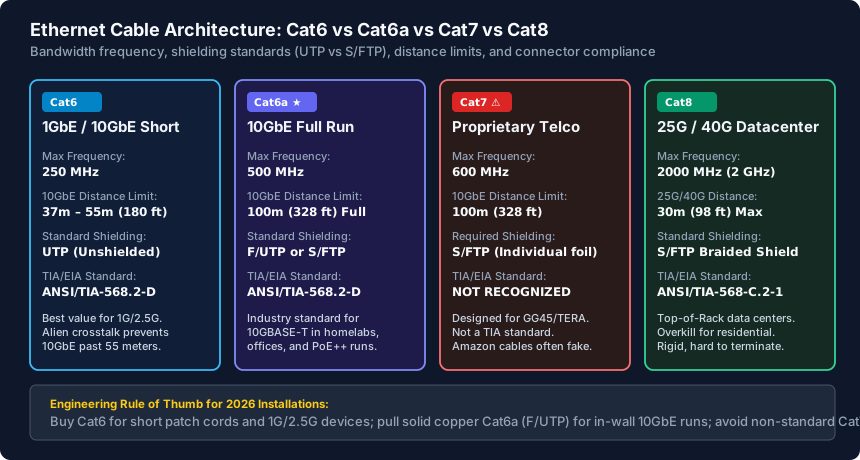
- Cat6 Is Best Value for 1G & 2.5G: Supports up to 250 MHz frequency and achieves 10-Gigabit speeds up to 37–55 meters (121–180 ft) in low-interference environments.
- Cat6a Is the 10GbE Gold Standard: Rated for 500 MHz and certified for full 100-meter (328 ft) 10GBASE-T runs using standard RJ45 connectors with zero alien crosstalk.
- Avoid Buying Cat7 for Homes: Cat7 is an ISO/IEC standard that requires proprietary non-RJ45 connectors (GG45 or TERA); Amazon 'Cat7' cables with plastic RJ45 plugs are non-compliant marketing gimmicks.
- Cat8 Is Strictly Datacenter Short-Run: Rated for 2,000 MHz (2 GHz) to carry 25G and 40G data over a maximum distance of 30 meters (98 ft); too thick, rigid, and expensive for in-wall residential wiring.
Ethernet Cable Categories Compared: Bandwidth, Shielding & Frequency
When wiring a home, small business, or enterprise server rack, choosing an Ethernet cable category dictates your network's maximum transmission frequency, theoretical speed ceiling, and maximum physical run distance.
Each successive category increases the wire gauge (typically from 24 AWG down to 22 AWG solid copper) and tightens the internal twisted pair pitch. These physical twists, combined with internal plastic spline separators and foil shielding, mitigate Near-End Crosstalk (NEXT) and Alien Crosstalk (ANEXT).
Why Cat7 Is a Proprietary Trap for Home & Office Networks
Search Amazon or retail marketplaces for Ethernet cables, and you will see thousands of cheap flat cables branded as 'Cat7 Ultra High Speed.' In reality, Cat7 is almost never recognized by official TIA/EIA networking standards in North America.
Here is the technical reality of Category 7 (ISO/IEC 11801 Class F):
- Non-Standard Connectors: True Cat7 was engineered in 2002 to operate at 600 MHz using specialized, proprietary connectors such as GG45 (developed by Nexans) or TERA (developed by Siemon). The 8P8C modular connector (standard RJ45) was deemed inadequate to meet Cat7's strict crosstalk parameters.
- The RJ45 Gimmick: Any cable sold online with standard plastic RJ45 plugs labeled 'Cat7' is legally an uncertified hybrid. When terminated with an RJ45 jack, high-frequency performance drops back down to Cat6a parameters, completely negating any theoretical Cat7 advantage.
- Grounding Requirements: True Cat7 mandates S/FTP (Screened Fully Shielded Twisted Pair) construction. If the overall braided shield and individual foil shields are not bonded to an enterprise rack ground busbar at the patch panel, the floating shield turns into an antenna, degrading signal-to-noise ratio (SNR).
When Cat8 Makes Sense (And Why It Is Overkill for 99% of Users)
Category 8 (ANSI/TIA-568-C.2-1) is a legitimate, certified networking standard, but its use case is severely misunderstood by consumer buyers. Cat8 was designed specifically for datacenter top-of-rack (ToR) switch-to-server interconnects.
Consider the engineering specifications of Cat8:
- Extreme 2,000 MHz (2 GHz) Frequency: Cat8 quadruples the frequency of Cat6a to transmit 25 Gbps (25GBASE-T) and 40 Gbps (40GBASE-T) over copper.
- Strict 30-Meter (98 ft) Distance Limit: Cat8 signals attenuate rapidly at 2 GHz. It is limited to a 24-meter permanent link plus two 3-meter patch cords (30 meters total channel length). Running Cat8 across an entire house or between floors exceeds this distance limit, causing link degradation.
- Physical Bulk and Rigidity: Real Cat8 cables utilize heavy 22 AWG solid copper conductors with double-layer foil and braided shielding. They are stiff, difficult to bend around wall studs, and require heavy-duty die-cast metal shielded RJ45 field-termination plugs that cost $8 to $15 each.
- Fiber (SFP+ / SFP28) Is Superior: In modern datacenters and 10G/25G homelabs, engineers choose fiber optic cables (OM4 multimode or OS2 single-mode with SFP28 transceivers) or Direct Attach Copper (DAC) cables. Fiber generates zero heat, uses less electrical power, and costs significantly less per meter than Cat8 copper.
The Definitive Buying Guide: What Cable to Buy for Your Project
Follow these vendor-neutral rules when selecting cabling for new construction, homelab upgrades, or desktop drops:
- Short Patch Cables (< 15 ft / 5m): Buy pre-molded, stranded 24 AWG Cat6 UTP patch cords. They are flexible, affordable, and easily negotiate 1GbE, 2.5GbE, 5GbE, and 10GbE speeds to your desktop PC, NAS, and access points.
- In-Wall Home Runs (< 180 ft / 55m): Solid copper 23 AWG Cat6 UTP is the most cost-effective choice for general residential wiring. It runs cool with PoE+ access points and handles 10GBASE-T up to 55 meters.
- Future-Proof In-Wall & Homelab Core: Pull solid copper 23 AWG Cat6a (F/UTP). Cat6a guarantees full 10-Gigabit performance across the entire 100-meter limit, supports high-power 90W 802.3bt PoE++ without thermal throttling, and eliminates alien crosstalk.
- Inter-Building or Shed Runs: Never use copper Cat6/7/8 between separate detached buildings. Pull OS2 Single-Mode Fiber in conduit to eliminate lightning surge risks and ground potential differentials.
Ethernet Category Technical Specification Matrix
| Cable Category | Max Frequency | Max Data Rate | Max 10GbE Distance | Shielding Type | Best Use Case |
|---|---|---|---|---|---|
| Cat5e | 100 MHz | 1 Gbps (1000BASE-T) | Not Recommended | UTP (Unshielded) | Legacy installs, IoT devices, budget 100M/1G links. |
| Cat6 | 250 MHz | 1 Gbps / 10 Gbps | 37m – 55m (121 – 180 ft) | UTP or F/UTP | Standard residential drops, 2.5GbE switches, short 10G runs. |
| Cat6a | 500 MHz | 10 Gbps (10GBASE-T) | 100m (328 ft) Full | F/UTP or S/FTP | Recommended 10GbE standard, PoE++ access points, new homes. |
| Cat7 (ISO) | 600 MHz | 10 Gbps | 100m (328 ft) | S/FTP (Individual foil) | Proprietary telco; avoid for standard RJ45 residential use. |
| Cat8 | 2,000 MHz (2 GHz) | 25 Gbps / 40 Gbps | 30m (98 ft) Max Channel | S/FTP (Braided + foil) | Datacenter Top-of-Rack server links; overkill for homes. |
How to Verify Your Ethernet Cable Is Real Solid Copper (Not Fake CCA)
- Inspect the printed cable jacket legend for certified standards like 'ANSI/TIA-568.2-D', 'ETL Verified', and wire gauge ('23AWG').
- Scrape the conductor tip with a utility blade to verify pure copper (avoid CCA where silver aluminum shows under a thin copper wash).
- Measure overall cable diameter with calipers: certified Cat6a uses thicker 23 AWG conductors resulting in a ~7.2 mm cable diameter.
- Verify channel link performance using a network certifier or by running 'iperf3 -c
-P 4 -t 30' across a 10GbE switch port.
Frequently Asked Questions
Can I plug a Cat8 cable into a standard Cat6 or Cat5e router?
Yes. Category 8 cables utilize the backward-compatible 8P8C modular connector (RJ45). You can plug a Cat8 cable into any standard 1GbE or 2.5GbE switch or router. However, the connection will only run at the speed of the slowest connected port (1 Gbps), providing zero performance increase over a standard Cat6 cable.
Is Cat7 better than Cat6a for gaming?
No. Cat7 offers zero ping or latency advantages over Cat6a. Online multiplayer games consume less than 1 Mbps of bandwidth. Both Cat6a and Cat7 deliver identical 1ms local network latency. Furthermore, most retail 'Cat7' cables on Amazon are uncertified knockoffs with plastic RJ45 plugs that fail official crosstalk standards.
Why are flat Ethernet cables not recommended for long runs?
Flat Ethernet cables align wire pairs parallel to each other instead of twisting them around an internal spline. This physical layout violates TIA/EIA twist ratios and drastically increases Near-End Crosstalk (NEXT). While flat cables are acceptable for short 3-foot runs under rugs, they frequently drop from Gigabit to 100 Mbps over longer distances.
What is the difference between solid copper and stranded Ethernet cables?
Solid copper cables feature a single rigid copper conductor per wire, making them ideal for in-wall horizontal runs, attic pulls, and punchdown keystone jacks. Stranded cables use bundles of microscopic copper threads, making them flexible for desktop patch cables that bend frequently. Never punch down stranded cable into punchdown patch panels.
Related Wired LAN & VLANs & Engineering Guides
- Best 2.5GbE & 10GbE Managed Switches for Homelabs & Small Offices — Compare the best 2.5GbE and 10GbE managed switches for homelabs and small offices: UniFi Enterprise 8, Omada SG3210X-M2, MikroTik, and QNAP tested.
- PoE Cable Distance & Voltage Drop Guide: 802.3af/at/bt Standards — Calculate PoE voltage drop and maximum Ethernet distances. Learn IEEE 802.3af/at/bt limits, 23 AWG Cat6 vs 24 AWG Cat5e resistance, and conduit heat dissipation.
- How to Test an Ethernet Cable with a Multimeter (Pin-by-Pin Guide) — Test Ethernet cables for continuity, shorts, and broken pairs with a digital multimeter. Step-by-step pin resistance testing and in-wall loopback guide.
- Ethernet Cable Max Length Guide: Cat5e, Cat6, Cat6a & Distance Limits — Learn the maximum cable length limits for Cat5e, Cat6, Cat6a, and Cat8. Discover how signal attenuation, attic heat, and 10GbE dropoffs affect cable runs.