
Unbound Recursive DNS Resolver Setup: Full Privacy
To eliminate third-party DNS logging and upstream ISP snooping, install Unbound as an iterative recursive DNS resolver running alongside Pi-hole, AdGuard Home, or OPNsense. Instead of forwarding DNS requests to Cloudflare or Google, Unbound queries the 13 authoritative Root Name Servers directly, validating DNSSEC cryptographic signatures locally to ensure authentic, tamper-proof responses.
- Iterative vs Forwarding: Forwarders (1.1.1.1, 8.8.8.8) log your entire domain lookup profile; Unbound queries the Root, TLD, and Authoritative servers directly without middleman logs.
- Cryptographic DNSSEC Validation: Unbound validates cryptographic trust chains from the ICANN Root Zone down to the target domain, rejecting spoofed or cache-poisoned DNS records.
- QNAME Minimization: Unbound sends only minimal domain labels (RFC 7816) to upstream root and TLD servers, keeping your full target destination private.
- Pi-hole Pairing on Port 5335: Running Unbound on custom loopback port 5335 provides the ultimate network privacy stack: network-wide ad-blocking plus recursive resolution.
DNS Forwarders vs Recursive Resolvers: How Iterative Root Queries Work
Whenever a device visits a website like packetsaver.com, it requires a Domain Name System (DNS) translation into an IP address. Most home networks rely on standard DNS Forwarders—either your ISP's default DNS servers or public recursive services such as Cloudflare (1.1.1.1), Google (8.8.8.8), or Quad9 (9.9.9.9). While encrypted protocols like DNS-over-HTTPS (DoH) hide queries from local Wi-Fi eavesdroppers, the central upstream resolver still observes, logs, and profiles every single domain your household accesses.
By contrast, Unbound functions as an independent, local Iterative Recursive DNS Resolver. It does not hand your queries to any commercial third party. Instead, Unbound maintains a local copy of the official IANA Root Hints file and performs resolution from scratch through the internet's hierarchical DNS tree:
- Root Name Server Query: Unbound contacts one of the 13 global Root Name Servers (
A.ROOT-SERVERS.NETthroughM.ROOT-SERVERS.NET) and asks: "Who manages the .com top-level domain?" The Root server returns the IP addresses of the 13 Verisign TLD servers. - TLD Name Server Query: Unbound queries a
.comTLD nameserver and asks: "Who manages packetsaver.com?" The TLD server returns the authoritative nameservers for that domain. - Authoritative Query: Unbound queries the domain's authoritative nameserver directly and receives the authentic IPv4 (A) and IPv6 (AAAA) records.
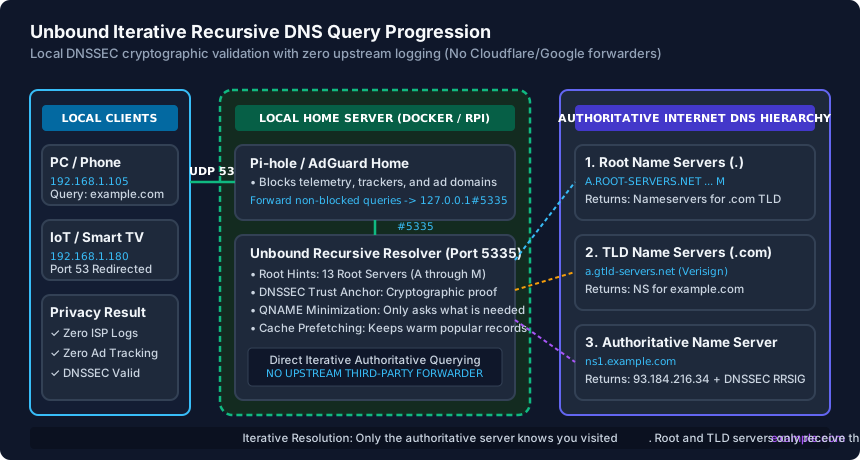
Because Unbound caches these results in local RAM, subsequent lookups for popular domains resolve in under 1 millisecond directly from your home server's memory.
Installing & Hardening Unbound with Root Hints and DNSSEC
Unbound is lightweight and runs on any Linux distribution, Raspberry Pi OS, or BSD system (built natively into OPNsense and pfSense). On Debian/Ubuntu systems, install the package via terminal:
sudo apt update && sudo apt install unbound -yBy default, Unbound pulls the official DNS root trust anchor for DNSSEC validation. Create a hardened configuration file at /etc/unbound/unbound.conf.d/pi-hole.conf tuned for high-privacy local recursion:
server:
    verbosity: 1
    interface: 127.0.0.1
    port: 5335
    do-ip4: yes
    do-udp: yes
    do-tcp: yes
    do-ip6: yes
    prefer-ip6: no

    # Privacy & Hardening
    harden-glue: yes
    harden-dnssec-stripped: yes
    use-caps-for-id: no
    edns-buffer-size: 1232
    prefetch: yes
    prefetch-key: yes
    qname-minimisation: yes

    # Cache Optimization
    rrset-cache-size: 64m
    msg-cache-size: 32m
    cache-min-ttl: 300
    cache-max-ttl: 86400

    # Access Control
    access-control: 127.0.0.1/32 allow
Two directives in this configuration are critical for privacy: qname-minimisation: yes strictly enforces RFC 7816, preventing Unbound from sending the full domain name to Root and TLD servers (asking the Root only for .com rather than secret.company.com). Meanwhile, prefetch: yes automatically refreshes expiring cache records before clients request them, keeping resolution latency instantaneous.
Pairing Unbound with Pi-hole or AdGuard Home on Port 5335
While Unbound delivers unmatched privacy and cryptographic integrity, it is not an ad-blocker. The ultimate self-hosted DNS setup combines Pi-hole or AdGuard Home (which blocks ads, trackers, and malicious domains via blocklists) with Unbound handling the recursive resolution for all permitted domains.
Because Pi-hole listens for client DNS requests on the standard DNS port (UDP/TCP 53), Unbound must be configured to listen on an alternative local port—typically 5335—as specified in our configuration above. After restarting Unbound with sudo systemctl restart unbound, configure Pi-hole to route through it:
- Log into your Pi-hole web dashboard and navigate to Settings > DNS.
- Under the Upstream DNS Providers column, uncheck all public forwarders (Google, Cloudflare, OpenDNS).
- Under Custom Upstream DNS, check Custom 1 (IPv4) and enter
127.0.0.1#5335. - Under Advanced DNS settings, uncheck Use DNSSEC inside Pi-hole (because Unbound handles DNSSEC validation natively and returns authenticated SERVFAIL responses for forged records).
- Scroll to the bottom and click Save.
Verify that resolution is functioning by executing a terminal query directly against the Unbound listening socket:
dig packetsaver.com @127.0.0.1 -p 5335The output should return status: NOERROR along with the ad (Authenticated Data) flag in the header, proving that the DNSSEC signature was validated successfully.
Benchmarking DNS Latency and Performance Tuning
A frequent myth regarding recursive DNS resolvers is that they are 'slower' than giant commercial Anycast CDNs like Cloudflare. While an initial cold query to an uncached domain takes 80–180 ms (due to traversing the Root, TLD, and Authoritative hierarchy sequentially), subsequent requests from any client on your network hit Unbound's local cache and resolve in under 1 ms.
To analyze your network's DNS speed and cache efficiency, install the DNS benchmark utility dnsping or run a multi-iteration test using dig:
# Test cold query latency
dig @127.0.0.1 -p 5335 github.com | grep "Query time"

# Test cached memory query latency
dig @127.0.0.1 -p 5335 github.com | grep "Query time"
The first lookup will report approximately Query time: 94 msec, while the immediate repeat lookup will report Query time: 0 msec. In an active household or small office, Unbound achieves a cache hit ratio of 75% to 85% throughout the day. With prefetch: yes and cache-min-ttl: 300 enabled, popular domains like Google, YouTube, Microsoft Teams, and Amazon remain permanently cached in local RAM, delivering faster real-world performance than any cloud resolver while keeping your browsing history completely sovereign.
DNS Resolution Architectures: Privacy, Security & Speed Comparison
| DNS Solution | Resolver Type | Upstream Query Logging | DNSSEC Validation | Cold Latency / Warm Latency | Primary Advantage |
|---|---|---|---|---|---|
| Unbound Local Resolver | Iterative Recursive | Zero (Direct to Auth servers) | Yes (Validated Locally) | 80–180 ms / <1 ms | 100% Privacy: Eliminates middleman logging and ISP tracking |
| Cloudflare (1.1.1.1) | Public Forwarder (DoH/DoT) | Logs anonymized query data | Yes (Validated by Cloudflare) | 12–25 ms / 12–25 ms | Fast cold cache, global Anycast CDN routing |
| Quad9 (9.9.9.9) | Public Forwarder (DoT) | Zero logging policy (Swiss legal) | Yes (With threat blocking) | 18–35 ms / 18–35 ms | Built-in commercial malware/phishing domain blocking |
| Google Public DNS (8.8.8.8) | Public Forwarder (DoH) | Logs stored and correlated | Yes (Validated by Google) | 15–30 ms / 15–30 ms | Massive global capacity and ECS geolocation precision |
| Standard ISP DNS | Unencrypted Forwarder | Full ISP logging & ad-injection | Rarely enforced | 20–60 ms / 20–60 ms | Default setup, but vulnerable to DNS hijacking and logging |
Unbound Recursive DNS Deployment Checklist
- Install Unbound package on your home server, Raspberry Pi, or OPNsense router.
- Verify Root Hints file is up to date and DNSSEC trust anchor is initialized via
unbound-anchor. - Configure Unbound to listen strictly on loopback interface
127.0.0.1port5335. - Enable
qname-minimisationandprefetchinside the Unbound configuration file. - Set Pi-hole or AdGuard Home custom upstream DNS to
127.0.0.1#5335and disable public DNS forwarders. - Execute
dig @127.0.0.1 -p 5335 sigfail.verteiltesysteme.netand verify output returnsSERVFAIL.
Frequently Asked Questions
Is Unbound slower than using Cloudflare 1.1.1.1 or Google 8.8.8.8?
For uncached cold domains, Unbound takes slightly longer (80–180 ms vs 15–30 ms) because it must query Root, TLD, and Authoritative servers sequentially. However, for cached warm domains (which account for 75%+ of typical household queries), Unbound returns results in under 1 millisecond directly from local RAM, making daily browsing feel instantaneous.
Why does Unbound listen on port 5335 instead of port 53?
Standard DNS operates on port 53. When pairing Unbound with Pi-hole or AdGuard Home, the ad-blocker must bind to port 53 so your network clients can reach it. Unbound is assigned port 5335 to avoid port collision, serving as the local upstream backend strictly for the ad-blocker.
Can my ISP still see my DNS queries if I use Unbound?
Because Unbound queries Authoritative servers over standard UDP/TCP port 53 in plain text, an ISP using deep packet inspection (DPI) could theoretically log individual SNI/DNS packets. However, because queries are dispersed across thousands of authoritative servers globally with QNAME minimization, no single provider receives your full browsing profile. To prevent ISP inspection entirely, route Unbound traffic through a WireGuard VPN tunnel.
How do I test if DNSSEC validation is actually working in Unbound?
Run dig @127.0.0.1 -p 5335 sigok.verteiltesysteme.net (which should return NOERROR with valid IP), followed by dig @127.0.0.1 -p 5335 sigfail.verteiltesysteme.net (which has an intentionally broken cryptographic signature). If Unbound returns SERVFAIL for the second domain, your local DNSSEC validation is operating perfectly.
Related Home Network Security & Engineering Guides
- DNS over HTTPS (DoH) vs DNS over TLS (DoT): Router Setup Guide — Compare DNS over HTTPS (DoH port 443) and DNS over TLS (DoT port 853) on home routers to stop ISP DNS snooping using Cloudflare, Quad9, and NextDNS resolvers.
- How to Secure Home WiFi (12-Step Hardening Guide) — Harden your home WiFi network in 12 practical steps. Enable WPA3-SAE encryption, disable WPS and UPnP, isolate IoT VLANs, and lock down router admin access.
- Router Default Password Safety & Credential Hardening — Eliminate default router credentials before botnets hijack your gateway. Separate admin passwords from WiFi WPA3 keys and enforce LAN HTTPS management.
- Router Firewall Settings Explained (SPI, NAT & Rules) — Master your router firewall settings. Configure Stateful Packet Inspection (SPI), disable broken SIP ALG for VoIP, block WAN pings, and secure IPv6 rules.