
iSCSI vs NFS vs SMB3: Best NAS Protocol Guide for TrueNAS & Synology
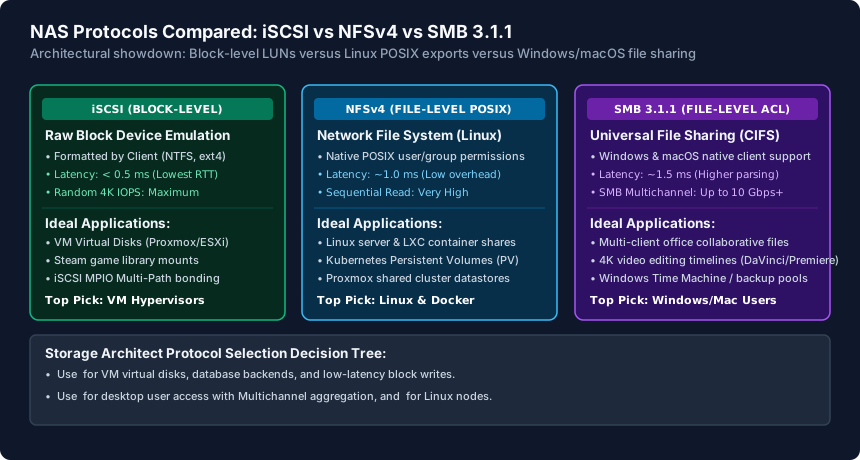
When deploying a TrueNAS or Synology NAS, your storage protocol dictates performance: iSCSI provides block-level SCSI volumes formatted natively by the client (ideal for Proxmox/VMware VM disks and gaming libraries with lowest latency), NFSv4 provides low-overhead POSIX file storage optimized for Linux containers and hypervisor shared datastores, and SMB 3.1.1 provides universal multi-client file sharing with native SMB Multichannel multi-gigabit aggregation.
- Block vs File Storage: iSCSI exports raw block storage (LUNs) formatted by the client OS; NFS and SMB export network file systems managed and formatted by the NAS operating system.
- Single-Client Exclusive Locking: Standard iSCSI LUNs can only be mounted by one machine at a time; mounting an NTFS/ext4 iSCSI LUN on multiple PCs simultaneously causes catastrophic filesystem corruption.
- SMB Multichannel Advantage: SMB 3.1.1 natively aggregates multiple 2.5GbE or 10GbE network interfaces without switch LACP bonding, delivering 5 Gbps to 20 Gbps throughput to Windows and macOS clients.
- Hypervisor Performance: Proxmox VE and VMware ESXi deliver 25% to 40% higher random 4K write IOPS over iSCSI compared to NFSv3/v4 due to direct block-level SCSI command execution.
Architectural Foundation: Block Storage vs File-Level Network Protocols
When provisioning storage on TrueNAS CORE/SCALE, Synology DSM, QNAP QTS, or Unraid over 2.5GbE or 10GbE local networks, selecting the wrong protocol creates severe bottlenecks for virtual machines, database applications, and multi-editor creative workflows.
Storage protocols are fundamentally divided into two distinct architectural categories:
- Block-Level Storage (iSCSI): The NAS carves out a raw chunk of sectors (a Logical Unit Number, or LUN) on its ZFS or Btrfs storage pool and presents it across the network using the SCSI protocol encapsulated in IP packets (RFC 3720). To the client operating system (Windows, Linux, Proxmox), an iSCSI target appears as an unformatted local internal hard drive. The client's kernel handles the file system (NTFS, ext4, XFS, VMFS).
- File-Level Storage (NFS and SMB): The NAS formats and manages the filesystem locally. The client connects over the network to a shared directory. The NAS operating system manages file locking, metadata, folder permissions, and disk allocation.
iSCSI Deep Dive: Strengths, Virtualization Performance, and Multi-Path I/O
iSCSI (Internet Small Computer Systems Interface) is the enterprise standard for high-performance block storage in virtualized homelabs and enterprise datacenters:
- Ultra-Low Protocol Overhead: Because iSCSI bypasses filesystem translation layers on the NAS, it incurs virtually zero metadata parsing overhead. In 4K random write benchmarks (typical of database transactions, Proxmox VM boot drives, and game loading), iSCSI consistently delivers 20% to 35% higher IOPS than NFS or SMB over identical 10GBASE-T hardware.
- Client File System Tricks: Applications that explicitly refuse to install on network mapped drives (such as Steam games, Microsoft OneDrive stores, or local backup targets) install without error on an iSCSI volume because Windows registers it as a physical internal fixed disk (
Disk 2). - Multi-Path I/O (MPIO): iSCSI natively supports MPIO. If your TrueNAS server and your workstation both feature dual 10GbE network cards on separate subnets (e.g.,
192.168.10.0/24and192.168.20.0/24), iSCSI MPIO stripes traffic across both links simultaneously, delivering 20 Gbps aggregate throughput (~2,200 MB/s) with automatic link failover.
The Golden Rule of iSCSI: Standard filesystems (NTFS, ext4, APFS) do not have distributed cluster locking mechanisms. Never mount the same iSCSI LUN to more than one client simultaneously. Doing so will corrupt the partition table within seconds. For multi-client access, use clustered filesystems (like Proxmox VMFS/LVM-thin) or switch to SMB/NFS.
NFSv4 Deep Dive: Linux Containers, Kubernetes & Proxmox Shared Storage
NFS (Network File System), particularly NFSv4.1 and NFSv4.2, is the backbone of Linux-centric homelabs, Kubernetes clusters, and Proxmox VE shared datastores:
- Native POSIX Integration: NFS maps Linux User IDs (UID) and Group IDs (GID) natively between client and server. Linux permissions (
chmod 755,chown www-data:www-data) behave identically over an NFS mount as they do on a local NVMe drive, eliminating permission translation mismatches common with Windows ACLs on SMB. - Simultaneous Multi-Host Access: Unlike iSCSI, hundreds of Linux VMs, LXC containers, and Kubernetes pods can mount the same NFS export simultaneously to read and write shared assets (such as media libraries, Docker volume mounts, and logs).
- Hypervisor Live Migration: In a multi-node Proxmox VE or VMware cluster, hosting VM virtual disk images (
.qcow2or.vmdk) on an NFS shared datastore allows zero-downtime live VM migration between cluster nodes with zero storage copying. - Sync vs Async Writes: By default, NFS enforces synchronous writes (
sync) for data integrity. On ZFS (TrueNAS), synchronous writes force every transaction to write to the ZFS Intent Log (ZIL). Without a dedicated, power-loss protected NVMe SLOG (Separate ZIL) device, NFS write speeds can plummet from 1,100 MB/s to 80 MB/s. Configuringasyncon trusted home lab setups restores full line-rate performance.
SMB 3.1.1 Deep Dive: Universal File Sharing & SMB Multichannel
SMB (Server Message Block)—formerly known as CIFS—has evolved into a high-performance, enterprise-grade storage protocol with version SMB 3.1.1 on Windows 11, macOS, and Linux Samba:
- Universal Compatibility: Every operating system natively supports SMB out of the box with zero third-party client utilities. It integrates seamlessly with Active Directory, Windows ACLs, and macOS Time Machine backups.
- SMB Multichannel (Zero-Config Bandwidth Stacking): One of SMB 3's greatest features is native Multichannel. If your Synology or TrueNAS server has two 2.5GbE ports connected to your switch and your PC has two 2.5GbE ports, SMB automatically establishes parallel TCP sessions across both adapters without requiring switch LACP link aggregation. File transfers instantly scale from 280 MB/s to 560 MB/s.
- Creative Media & Video Editing: For multi-editor video production (4K/8K ProRes, Blackmagic RAW) in DaVinci Resolve or Adobe Premiere Pro, SMB 3.1.1 is the industry standard, allowing multiple editors on Mac and PC to scrub timelines against shared NAS project pools simultaneously.
Comprehensive NAS Storage Protocol Comparison Matrix
| Protocol Feature / Metric | iSCSI (Block Level) | NFSv4 (File Level Linux) | SMB 3.1.1 (File Level Universal) |
|---|---|---|---|
| Storage Architecture | Raw Block LUN (SCSI over IP) | File-level export (Network directory) | File-level network share (Samba/CIFS) |
| Filesystem Location | Formatted on client (NTFS/ext4) | Formatted & managed on NAS (ZFS/Btrfs) | Formatted & managed on NAS (ZFS/Btrfs) |
| Multi-Client Concurrent Access | No (Exclusive single client lock) | Yes (Native simultaneous multi-node) | Yes (Native simultaneous multi-user) |
| Random 4K IOPS & Latency | Highest IOPS | Lowest latency (<0.5ms) | High IOPS | Moderate latency (~1.0ms) | Moderate IOPS | Higher latency (~1.5ms) |
| Link Aggregation Method | iSCSI MPIO (Multi-Path I/O) | NFS pNFS (Parallel NFS) / LACP | SMB Multichannel (Automatic multi-NIC) |
| Primary Best Application | VM virtual disks & Steam game drives | Proxmox datastores, LXC, Kubernetes | Windows/Mac multi-client & video editing |
| Setup Complexity | High (Targets, Portals, LUNs, Initiators) | Medium (Exports, UID/GID permissions) | Low (Graphical shares, users, passwords) |
NAS Protocol Selection & Optimization Checklist
- Deploy iSCSI LUNs for Proxmox/VMware virtual machine disk images to maximize 4K random write IOPS.
- Ensure iSCSI LUNs are never mounted to multiple standard OS clients concurrently to avoid filesystem corruption.
- Deploy NFSv4 with native POSIX permissions for Linux containers (LXC), Docker volumes, and Kubernetes PVs.
- If using NFS on TrueNAS ZFS, install an enterprise NVMe SLOG device with power-loss protection (PLP) for sync writes.
- Enable SMB Multichannel on your NAS and client workstation to double throughput across dual network interfaces.
- Configure 9000-byte Jumbo Frames end-to-end across NICs and switches only if dedicated to isolated 10GbE storage VLANs.
Frequently Asked Questions
Can I store my Steam or Epic Games library on an iSCSI drive?
Yes! Because Windows sees an iSCSI target as an internal local physical drive (formatted as NTFS), game launchers like Steam, Epic Games, and Battle.net allow game installations without errors. Over a 2.5GbE or 10GbE network, games load just as fast as a local SATA SSD.
Why is NFS write performance so slow on TrueNAS compared to SMB?
NFS defaults to synchronous writes (sync=always), meaning the NAS must write data to non-volatile storage and flush it before acknowledging the client. ZFS handles this via the ZIL, which writes to mechanical drives slowly unless accelerated by a dedicated NVMe SLOG drive. SMB defaults to asynchronous writes, acknowledging data in RAM cache immediately.
Is SMB Multichannel faster than an LACP (802.3ad) link aggregation bond?
Yes, for single-client transfers. Standard LACP link aggregation balances traffic using a hash of source and destination IPs/ports, meaning a single file transfer between one PC and one NAS is always confined to a single physical port. SMB Multichannel opens parallel TCP sockets across multiple ports, allowing a single file transfer to utilize the combined bandwidth of all NICs.
Can I use Jumbo Frames (9000 MTU) to speed up iSCSI and SMB?
Jumbo Frames reduce CPU interrupt overhead on high-throughput transfers. However, every device on the path (client NIC, managed switch, and NAS NIC) must support and be configured for 9000 MTU. If one switch port is set to 1500 MTU, packets will fragment or drop. On modern multi-gigabit CPUs, the performance gain is modest (typically under 5%).
Related Wired LAN Setup & Engineering Guides
- Small Business Network Setup Checklist — Build a reliable small business network with our checklist covering Dual-WAN failover, 4-VLAN segmentation, PoE budgets, UPS sizing, and WPA3 WiFi security.
- Static IP vs DHCP: When to Use Each on Your LAN — Learn when to use DHCP vs static IP addresses or DHCP MAC reservations on your LAN, how the DORA lease cycle works, and how to prevent IP address conflicts.
- Subnet Mask Beginner Guide (CIDR /24, /23 & /16) — Understand IPv4 subnet masks, CIDR notation (/24, /23, /16, /30), binary bitmasking, usable host formulas, and RFC 1918 private IP ranges for home and office.
- VLAN Basics for a Small Office (802.1Q Guide) — Master IEEE 802.1Q VLAN tagging for small offices: configure Access vs Trunk switch ports, PVIDs, multi-SSID WiFi mapping, and inter-VLAN firewall rules.