
SFP+ Transceiver Compatibility Guide: DAC, Fiber & 10GBASE-T
While the physical 10G SFP+ form factor follows the open SFF-8431 specification, transceiver compatibility depends on vendor EEPROM programming. Open vendors like Ubiquiti UniFi and MikroTik accept virtually all multi-vendor optics, whereas enterprise switches (Cisco, HP, Intel) reject generic modules unless vendor-coded. For in-rack connections under 5 meters, use Passive DAC cables (<0.1W, <0.1µs latency); for structured runs, use 10GBASE-SR fiber.
- In-Rack Interconnect Champion: Direct Attach Copper (DAC) twinax cables cost ~$15, consume less than 0.1 Watts of power, generate zero heat, and provide lower latency (<0.1 µs) than any optical or RJ45 alternative.
- 10GBASE-T RJ45 Warning: 10GbE RJ45 copper transceivers draw 2.5W–3.0W and exceed 75°C; never install them in adjacent switch ports to avoid thermal shutdown, and restrict cable lengths to under 30 meters.
- Optical Fiber Selection: Use 10GBASE-SR with aqua OM3/OM4 multimode LC duplex fiber for runs up to 300 meters; use 10GBASE-LR with yellow OS2 single-mode fiber for runs up to 10 kilometers.
- Vendor EEPROM Locks: Cisco and Intel hardware require vendor-coded EEPROM optics or explicit CLI override commands (such as
service unsupported-transceiveron Cisco or driver modprobe options on Linux).
Understanding the SFP+ Ecosystem: Form Factors and Compatibility Realities
When transitioning from 1GbE to 10GbE networking, many homelabbers and network engineers encounter SFP+ (Small Form-factor Pluggable Plus) ports on switches, routers, and Network Attached Storage (NAS) appliances. While standard RJ45 ports integrate the physical PHY layer directly onto the motherboard, SFP+ ports are modular cages that accept interchangeable transceiver modules.
The mechanical and electrical interfaces of SFP+ are standardized under the SFF-8431 Multi-Source Agreement (MSA). However, physical compatibility does not guarantee that your switch operating system will link up. Transceivers contain an onboard I2C EEPROM microchip programmed with vendor identification codes, serial numbers, wavelength specifications, and checksums.
Manufacturers treat these EEPROM codes with vastly different security policies:
- Universal Compatibility (Open Vendors): Ubiquiti UniFi, MikroTik, TP-Link Omada, and QNAP do not enforce proprietary vendor locks. Their switches accept generic MSA transceivers, FS.com modules, 10Gtek cables, and third-party optics without throwing errors or disabling ports.
- Strict Proprietary Locks (Enterprise Vendors): Cisco, HPE/Aruba, Dell, and Intel switches and network interface cards (NICs) read the vendor EEPROM table during port initialization. If the module does not contain a cryptographically matching vendor signature, the switch administrative state immediately marks the port as
err-disabledorunsupported-transceiver.
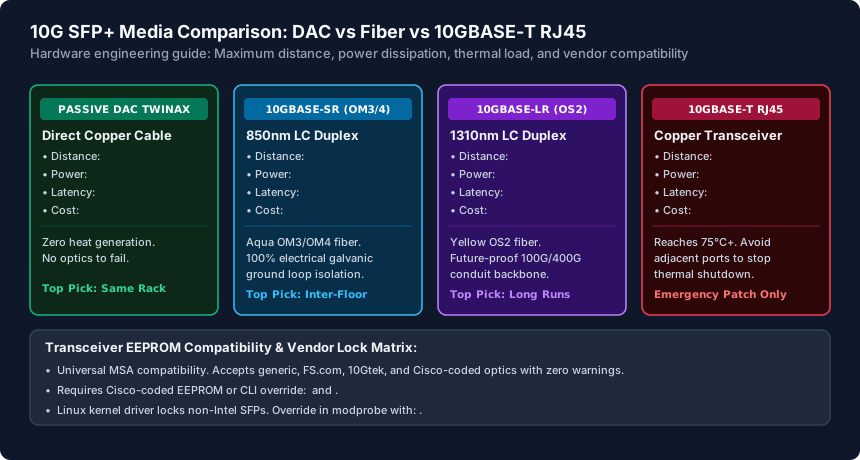
The Three Physical Interconnects: DAC vs Optical Fiber vs 10GBASE-T RJ45
Selecting the right physical media for your 10G SFP+ ports depends on distance, power budget, and thermal dissipation limits:
1. Direct Attach Copper (DAC Twinax) — The Homelab Champion
Passive SFP+ Direct Attach Copper cables feature permanently attached SFP+ connector heads molded onto twinaxial shielded copper cable. Because they do not convert electrical signals into light, DAC cables consume less than 0.1 Watts of power and generate virtually zero heat. They introduce less than 0.1 microseconds of latency and cost between $12 and $20 for a 0.5m to 3m run. Use DAC for all in-rack switch-to-switch and switch-to-server interconnects.
2. Optical Transceivers (10GBASE-SR and 10GBASE-LR) — Long Distance & Isolation
Optical transceivers convert electrical signals into laser light pulses over dual-strand LC fiber optic cables:
- 10GBASE-SR (Short Reach): Operates at 850nm wavelength over Multi-Mode Fiber (MMF). When paired with 50/125µm aqua OM3 or magenta OM4 fiber, it delivers 10 Gbps line rates up to 300 meters. Transceiver power consumption is very low (~0.8W).
- 10GBASE-LR (Long Reach): Operates at 1310nm wavelength over Single-Mode Fiber (SMF) with yellow OS2 patch cables, delivering flawless 10 Gbps signals up to 10 kilometers.
Optical fiber provides 100% galvanic electrical isolation, making it the only safe choice for connecting switches located in detached garages, separate buildings, or outdoor security poles where lightning strikes and ground potential differences would fry copper equipment.
3. 10GBASE-T RJ45 Copper Transceivers — The Emergency Workaround
10GBASE-T SFP+ transceivers convert an SFP+ cage into a standard RJ45 port for use with existing Cat6a twisted-pair wiring. However, these modules push the physical power limits of SFP+ cages. They draw 2.5W to 3.0W per port and reach blistering operational temperatures exceeding 75°C (167°F). Furthermore, they are capped at a maximum distance of 30 meters on Cat6a. Never install 10GBASE-T RJ45 transceivers in adjacent SFP+ ports on fanless switches, as the concentrated heat will trigger thermal throttling or equipment shutdown.
Bypassing Vendor Locks on Cisco, Intel, and Enterprise Gear
If you are deploying enterprise-grade surplus hardware in your homelab (such as Cisco Catalyst 3750X/3850 switches or Intel X520-DA2 dual-port 10G PCIe NICs), you will likely encounter vendor transceiver locks. Fortunately, you can easily bypass these restrictions:
Bypassing Cisco SFP+ Validation via CLI:
Connect to your Cisco switch via SSH or console cable, enter privileged configuration mode, and execute the hidden unsupported transceiver override commands:
# Enter global configuration mode
configure terminal

# Enable third-party multi-source agreement (MSA) optics
service unsupported-transceiver

# Prevent the switch from placing ports into error-disabled state
no errdisable detect cause gbic-invalid
end

# Save your configuration to NVRAM
write memory
Bypassing Intel X520 Linux Kernel Driver Locks:
The Linux ixgbe kernel driver for Intel X520 10G NICs deliberately disables link negotiation if a non-Intel SFP+ transceiver is detected. You can bypass this check by passing an argument to the kernel module in /etc/modprobe.d/:
# Create an override file for the ixgbe driver
echo "options ixgbe allow_unsupported_sfp=1" | sudo tee /etc/modprobe.d/ixgbe.conf

# Reload the kernel module (or reboot the host)
sudo modprobe -r ixgbe
sudo modprobe ixgbe
SFP vs SFP+ vs SFP28: Backward Compatibility Rules
Understanding port backwards compatibility prevents costly hardware mismatches when interconnecting gear of different generations:
- 1G SFP Module in a 10G SFP+ Cage: Generally supported. Most managed 10G SFP+ switches (such as UniFi Pro switches and MikroTik CRS models) allow you to insert a standard 1 Gbps SFP module and manually configure the port speed to
1000 Mbps FDXin the management interface. However, auto-negotiation often fails, requiring manual speed locking. - 10G SFP+ Module in a 1G SFP Cage: Never supported. An older 1 Gbps SFP cage lacks the high-frequency clocking and electrical circuitry required to power or decode a 10 Gbps SFP+ module. The link will remain physically down.
- 10G SFP+ in a 25G SFP28 Cage: Fully supported. SFP28 is the exact same mechanical form factor as SFP+, and virtually all 25G SFP28 switch ports are natively backwards compatible with 10G SFP+ optical modules and DAC cables.
Recommendation: When purchasing transceivers for a mixed homelab, buy custom-coded transceivers from vendors like FS.com (which allows you to code Side A for Cisco and Side B for Ubiquiti on the same DAC cable) or stick to standard 10Gtek passive twinax for open switches.
10G SFP+ Physical Interconnect Comparison Matrix
| Interconnect Type | Max Distance | Power / Thermal Load | Latency & Best Application |
|---|---|---|---|
| Passive DAC Twinax | 0.5m – 5.0m | < 0.1 W (Zero heat) | < 0.1 µs | Best for in-rack switch-to-switch & NAS |
| Active Optical Cable (AOC) | 5.0m – 30m | ~0.6 W (Very low) | < 0.2 µs | Thin, lightweight inter-rack routing |
| 10GBASE-SR (OM3/OM4 MMF) | Up to 300m | ~0.8 W (Low heat) | < 0.5 µs | Best for structured homelab & inter-floor |
| 10GBASE-LR (OS2 SMF) | Up to 10 km | ~1.2 W (Moderate) | < 0.5 µs | Best for campus links & detached buildings |
| 10GBASE-T RJ45 (Cat6a) | Max 30m | 2.5W – 3.0W (75°C HOT) | 2.5 µs | Emergency drop only; avoid adjacent ports |
| 1000BASE-T RJ45 (1G SFP) | Max 100m | ~1.0 W (Cool) | 0.5 µs | Legacy 1GbE uplink into 10G SFP+ cage |
10G SFP+ Hardware Deployment Checklist
- Deploy Passive DAC twinax cables for all connections within the same server rack under 5 meters.
- Choose 10GBASE-SR optics with aqua OM3 or magenta OM4 LC duplex multimode fiber for runs between rooms or floors.
- Select single-mode 10GBASE-LR optics for detached buildings to ensure complete galvanic electrical isolation from lightning surges.
- Avoid placing 10GBASE-T RJ45 copper modules in adjacent SFP+ cages to prevent thermal shutdown.
- Verify whether your switch enforces EEPROM vendor locks (Cisco/HPE/Intel) or accepts generic MSA optics (Ubiquiti/MikroTik).
- Manually lock SFP+ port link speed to 10 Gbps (or 1 Gbps for legacy SFPs) if auto-negotiation fails to establish link.
Frequently Asked Questions
Can I connect an SFP+ port to an RJ45 Ethernet port?
Yes. You can insert a 10GBASE-T SFP+ to RJ45 copper transceiver module into your switch's SFP+ cage. This allows you to connect a standard Cat6a or Cat7 Ethernet cable up to 30 meters. However, these modules generate significant heat (consuming ~2.7 Watts), so do not place them directly adjacent to each other.
What is the difference between OM3 and OM4 fiber optic cables?
Both OM3 and OM4 are 50/125µm laser-optimized multimode fiber cables with aqua or violet jacketing. For 10GBASE-SR transmissions, OM3 supports distances up to 300 meters, while higher-bandwidth OM4 supports up to 400 meters. For home and small office setups, OM3 is more than sufficient.
Why does my 10G SFP+ link show connected at 1 Gbps instead of 10 Gbps?
This occurs if one end of the link is a 1 Gbps SFP port or if the switch's auto-negotiation misidentifies the cable. Log in to your switch management dashboard and manually set the port speed from 'Auto' to '10 Gbps FDX' (Full Duplex) on both interconnected devices.
Can I use an SFP+ DAC cable between two different brand switches (e.g., Cisco and Ubiquiti)?
Ubiquiti switches accept any DAC cable, so a Cisco-compatible DAC will link up on both sides. However, if connecting between two strict enterprise brands (e.g., Cisco to HPE), you must order a custom-programmed DAC from vendors like FS.com with Cisco coding on Connector A and HPE coding on Connector B.
Related Wired LAN Setup & Engineering Guides
- Small Business Network Setup Checklist — Build a reliable small business network with our checklist covering Dual-WAN failover, 4-VLAN segmentation, PoE budgets, UPS sizing, and WPA3 WiFi security.
- Static IP vs DHCP: When to Use Each on Your LAN — Learn when to use DHCP vs static IP addresses or DHCP MAC reservations on your LAN, how the DORA lease cycle works, and how to prevent IP address conflicts.
- Subnet Mask Beginner Guide (CIDR /24, /23 & /16) — Understand IPv4 subnet masks, CIDR notation (/24, /23, /16, /30), binary bitmasking, usable host formulas, and RFC 1918 private IP ranges for home and office.
- VLAN Basics for a Small Office (802.1Q Guide) — Master IEEE 802.1Q VLAN tagging for small offices: configure Access vs Trunk switch ports, PVIDs, multi-SSID WiFi mapping, and inter-VLAN firewall rules.