
TP-Link ER707-M2 vs UniFi Cloud Gateway Max: Multi-Gig Faceoff
The TP-Link Omada ER707-M2 ($199) is a multi-WAN business router featuring dual 2.5GbE ports, four 1GbE ports, and an SFP fiber slot for multi-ISP failover. In contrast, the UniFi Cloud Gateway Max ($199–$279) features all five ports at 2.5GbE and includes an internal M.2 NVMe slot for camera recording.
- Switching Fabric: UCG-Max delivers five 2.5GbE ports across both WAN and LAN; ER707-M2 provides dual 2.5GbE with the remaining four copper ports capped at 1GbE.
- Built-in Security Camera NVR: UCG-Max includes an internal M.2 2280 NVMe SSD tray running UniFi Protect, eliminating the need for a separate NVR appliance.
- Multi-WAN Failover: ER707-M2 supports up to 6 WAN ports simultaneously (2.5G RJ45, 1G RJ45, and 1G SFP) with sophisticated policy-based multi-ISP load balancing.
- Controller Architecture: UCG-Max runs UniFi OS directly on internal hardware; ER707-M2 is a pure router requiring an external OC200 hardware controller, PC server, or cloud host.
Multi-Gigabit Port Layout: All-2.5GbE vs Dual-2.5GbE with SFP
As multi-gigabit broadband plans become standard for small offices and creative studios, network gateways must avoid bottlenecks between WAN handoffs and local distribution switches. The TP-Link Omada ER707-M2 and Ubiquiti UniFi Cloud Gateway Max (UCG-Max) represent the latest evolution of sub-$300 commercial gateways.
The core structural divergence lies in port capabilities. The UniFi UCG-Max is a pure multi-gigabit powerhouse: all five RJ45 ports operate at 2.5GbE (2.5GBASE-T). This provides one 2.5G WAN port and four independent 2.5G LAN ports. You can connect a 2.5GbE PoE switch, a 2.5GbE NAS server, and two high-speed workstations directly to the gateway at full line rate with zero 1GbE throttling.
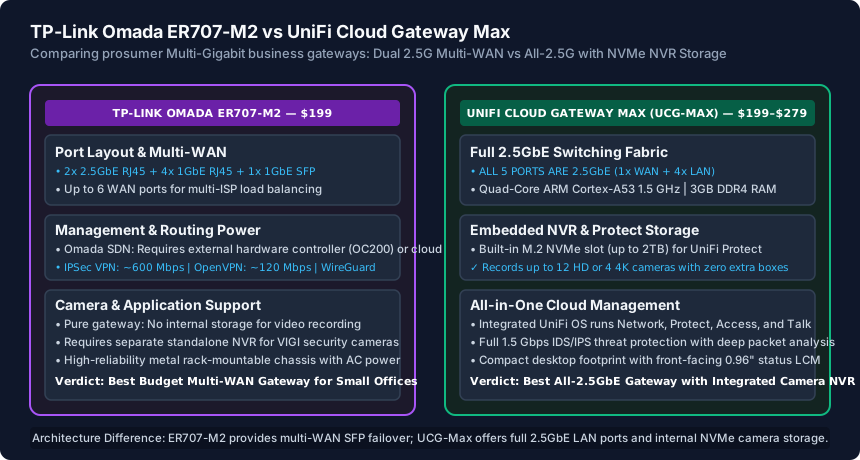
The TP-Link ER707-M2 takes a mixed approach: it provides two 2.5GbE RJ45 ports, four 1GbE RJ45 ports, and one 1GbE SFP optical cage. While excellent for multi-ISP connectivity, having only two 2.5G ports means one must be used for WAN and one for LAN, requiring you to immediately feed a downstream multi-gig switch to expand 2.5G connectivity to your office.
Integrated Video Surveillance: The UCG-Max NVMe NVR Advantage
The killer feature that sets the UniFi Cloud Gateway Max apart from every other gateway in its price class is its internal M.2 2280 NVMe SSD expansion bay. The UCG-Max can be purchased diskless ($199) or pre-loaded with a 512GB ($279), 1TB, or 2TB NVMe SSD.
This internal storage is not for system logs; it runs the full UniFi Protect NVR application natively on the gateway. The UCG-Max can record up to 12 Full HD (1080p) or 4 Ultra HD (4K) UniFi security cameras with AI vehicle, person, and package detection:
- Zero Extra NVR Box: Eliminates purchasing a standalone NVR appliance or paying monthly cloud subscriptions (Ring, Nest, Arlo).
- Silent Solid-State Reliability: Fast video playback scrubbing over local NVMe without mechanical spinning hard drive noise or heat.
- UniFi Protect Mobile App: Zero-subscription remote camera access with end-to-end encryption.
The TP-Link ER707-M2 is strictly a routing appliance. If you deploy TP-Link's VIGI security cameras, you must purchase a dedicated VIGI Network Video Recorder (such as the VIGI NVR1008H for $120) and install mechanical SATA hard drives, increasing rack space, cabling, and power draw.
Multi-WAN Failover & Enterprise SDN Controller Topologies
For medical clinics, retail stores, and remote offices where internet uptime is mission-critical, the ER707-M2 holds a decisive advantage in Multi-WAN load balancing and failover.
The ER707-M2 allows up to six of its seven interfaces to operate as WAN ports simultaneously. You can configure a primary 2.5G fiber connection, a secondary 1G cable backup, a 4G/5G cellular backup gateway, and an optical SFP link. The Omada firmware supports intelligent policy-based routing, link backup (failover in under 2 seconds), and weighted round-robin load balancing.
The UCG-Max supports Dual-WAN (with port remapping), but its primary strength lies in its embedded controller architecture. The UCG-Max runs UniFi OS on internal flash memory, hosting UniFi Network, Protect, Access, and Talk. The ER707-M2 is a standalone router; to manage it via the Omada SDN platform alongside access points, you must deploy an external TP-Link OC200 hardware controller ($99), spin up a Docker container on a server, or pay for Omada Cloud Essentials.
Routing Throughput, IDS/IPS & Final Buying Verdict
Under heavy multi-gigabit load, processor architecture dictates throughput headroom:
- UniFi UCG-Max: Powered by a quad-core ARM Cortex-A53 at 1.5 GHz with 3GB of RAM. It delivers 1.5 Gbps of routing throughput with full IDS/IPS (Deep Packet Inspection) enabled. Without IDS/IPS, it routes at full 2.5 Gbps line rate.
- Omada ER707-M2: Features a dual-core ARM Cortex-A53 processor with 1GB of RAM. It routes standard IPv4 NAT traffic at full 2.5 Gbps line rate, but lacks advanced deep packet signature inspection (IDS/IPS), relying instead on standard Layer-4 stateful SPI firewall rules.
Choose the Ubiquiti UniFi Cloud Gateway Max if: You want an all-2.5GbE network backbone, plan to run UniFi security cameras with internal NVMe recording, want 1.5 Gbps IDS/IPS threat protection, and prefer an integrated controller that requires zero external hardware.
Choose the TP-Link Omada ER707-M2 if: You need aggressive multi-ISP failover with up to 6 WAN connections, require an optical SFP cage, prefer metal 1U rackmount form factors, and already maintain an Omada SDN controller infrastructure.
TP-Link Omada ER707-M2 vs UniFi Cloud Gateway Max Comparison
| Specification / Feature | TP-Link Omada ER707-M2 | UniFi Cloud Gateway Max (UCG-Max) | Advantage |
|---|---|---|---|
| Base Price | $199 MSRP | $199 (Diskless) / $279 (512GB) | Tie (Identical base entry price) |
| Total Ethernet Ports | 7 Ports (2x 2.5G + 4x 1G + 1x SFP) | 5 Ports (ALL 5 are 2.5GbE RJ45) | UCG-Max (Pure 2.5G switching fabric) |
| Multi-WAN Capability | Up to 6 WAN ports (Multi-ISP failover) | Dual-WAN (1x Primary + 1x Backup) | ER707-M2 (Superior multi-ISP routing) |
| Internal NVR Storage | None (Requires external NVR box) | M.2 2280 NVMe SSD bay (up to 2TB) | UCG-Max (Native camera recording) |
| Surveillance App | Requires separate VIGI NVR | Runs UniFi Protect natively on NVMe | UCG-Max (Zero monthly fees, AI alerts) |
| Threat Inspection | Stateful SPI Firewall + ACLs | Full Layer-7 DPI + 1.5 Gbps IDS/IPS | UCG-Max (Deep enterprise security) |
| Controller Architecture | Requires OC200 ($99) or PC server | Embedded UniFi OS on internal flash | UCG-Max (All-in-one controller) |
| Form Factor & Power | Metal desktop/rackmount (Internal AC) | Compact desktop (USB-C 5V/3A external) | ER707-M2 (Rack-friendly internal power) |
Multi-Gig Gateway Deployment Checklist
- Verify ISP line rate: If using multi-gig WAN, confirm whether you need 2.5GbE LAN ports on the same box.
- Assess surveillance requirements: If adding cameras, evaluate the cost savings of UCG-Max's internal NVMe.
- Determine WAN failover count: If managing 3+ ISP lines, select the ER707-M2 for multi-WAN policy routing.
- Verify controller hosting: Factor in the cost of an external Omada OC200 controller if choosing TP-Link.
- Ensure Cat6 cabling is installed across all drops to support reliable 2.5GbE transmission up to 100 meters.
- Configure automated daily cloud config backups in UniFi Site Manager or Omada Cloud.
Frequently Asked Questions
Can I install my own third-party M.2 NVMe SSD into the UniFi UCG-Max?
Yes! If you purchase the diskless version ($199), you can buy any standard PCIe 3.0 or 4.0 M.2 2280 NVMe SSD (up to 2TB from Samsung, Crucial, or Western Digital) and install it into the bottom drive tray. UniFi OS formats the drive automatically on boot.
Does the TP-Link ER707-M2 support WireGuard VPN?
Yes. Current Omada firmware releases for the ER707-M2 include native WireGuard server and client support alongside OpenVPN, IPsec, and L2TP, delivering approximately 350–400 Mbps of WireGuard throughput.
Can the UCG-Max run UniFi Access and UniFi Talk?
Yes. The UCG-Max runs the complete UniFi application suite: UniFi Network, UniFi Protect (cameras), UniFi Access (door access readers), and UniFi Talk (VoIP phones) all on the same compact gateway.
Does the ER707-M2 support 2.5 Gbps speeds on its SFP port?
No. The SFP cage on the ER707-M2 is strictly standard 1 Gbps (1000BASE-X). If you need 2.5 Gbps or 10 Gbps SFP+ optical ports in the Omada ecosystem, you must step up to the larger enterprise Omada ER8411 router.
Related Best Switches & Engineering Guides
- GL.iNet Flint 2 vs UniFi Cloud Gateway Ultra: Prosumer Router Comparison — GL.iNet Flint 2 (GL-MT6000) vs Ubiquiti UniFi Cloud Gateway Ultra (UCG-Ultra). Compare 2.5GbE ports, WireGuard speeds, SQM, and ecosystem pricing.
- PoE Switch Guide for Small Offices (802.3af/at/bt) — Master Power over Ethernet for small offices: compare IEEE 802.3af PoE, 802.3at PoE+, and 802.3bt PoE++, calculate watt budgets, and avoid 24V Passive PoE.
- Best Ethernet Switch for a Small Office (2026 Picks) — Compare the 5 best Ethernet switches for small offices: Netgear GS308E, TP-Link TL-SG108PE, Ubiquiti UniFi Lite 16 PoE, TRENDnet 2.5G, and Cisco CBS250.
- TP-Link TL-SG108PE vs Netgear GS308EP: 8-Port PoE+ Switch Comparison — Compare the TP-Link TL-SG108PE (4 PoE+ ports, 64W) and Netgear GS308EP/GS308EPP (8 PoE+ ports, 62W/123W) managed 8-port switches for VLANs, APs, and cameras.