
Proxmox Network Bridge & 802.1Q VLAN Setup Guide
To configure VLANs in Proxmox VE, edit your default Linux Bridge vmbr0 and set bridge-vlan-aware yes in /etc/network/interfaces or via the GUI. This transforms the single physical NIC into an IEEE 802.1Q trunk, allowing virtual machines and LXC containers to be tagged with isolated VLAN IDs without creating messy manual sub-interfaces.
- Enable VLAN Aware: Checking VLAN aware on
vmbr0enables dynamic 802.1Q packet filtering without needing individual sub-interfaces (likevmbr0.10). - Switch Trunk Prerequisite: The upstream managed switch port connecting to Proxmox must be configured as an 802.1Q Trunk port carrying your tagged VLAN IDs.
- Native VM Tagging: Assign VLAN tags directly under VM Hardware > Network Device (net0) > VLAN Tag to place machines onto segregated subnets instantly.
- Management Security: Keep Proxmox host web GUI management (port 8006) on a dedicated administrative VLAN or untagged native PVID to prevent unauthorized guest VM access.
Proxmox Networking Architecture: Linux Bridges vs Open vSwitch
Proxmox Virtual Environment (PVE) provides three distinct Layer-2 networking models out of the box: traditional Linux Bridges (vmbr), Linux Bonding (bond), and Open vSwitch (OVS). In a standard fresh installation, Proxmox creates a single non-VLAN-aware bridge named vmbr0 mapped to your physical Ethernet interface (such as eno1, eth0, or enp3s0). In this legacy mode, every virtual machine attached to vmbr0 shares the same flat Layer-2 broadcast domain as your hypervisor host.
Historically, network engineers isolated virtual machines by creating individual sub-interfaces and corresponding bridges for every virtual network—for example, attaching vmbr10 to eno1.10 for VLAN 10, and vmbr20 to eno1.20 for VLAN 20. While functional, this legacy approach clutters the host configuration table and requires a complete network daemon restart every time a new subnet is added to your homelab.
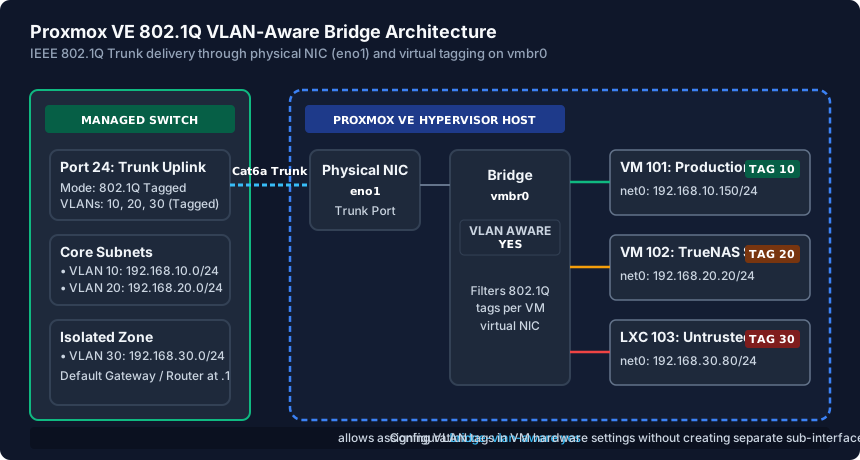
Modern Proxmox VE releases (PVE 7.x and 8.x) leverage modern Linux kernel bridge VLAN filtering via bridge-vlan-aware yes. This converts vmbr0 into an intelligent software switch capable of parsing 802.1Q encapsulation tags on the fly. You gain enterprise-grade multi-tenant network segmentation with zero extra bridges and negligible CPU overhead.
Enabling the VLAN-Aware Bridge via GUI and Configuration File
Activating VLAN filtering on Proxmox takes under two minutes and can be executed via the web interface or directly over SSH by editing /etc/network/interfaces. To configure via the web GUI:
- Navigate to your Proxmox Node name in the left tree menu, select System > Network, and double-click vmbr0.
- In the edit window, locate and check the box labeled VLAN aware.
- Leave the bridge ports assigned to your primary physical NIC (e.g.,
eno1) and click OK. - Click the orange Apply Configuration button at the top of the interface. Proxmox will reload
ifupdown2without interrupting active VM sessions or dropping SSH links.
If configuring headlessly via terminal, open /etc/network/interfaces in a text editor and add bridge-vlan-aware yes and bridge-vids 2-4094 under the vmbr0 stanza:
auto vmbr0
iface vmbr0 inet static
    address 192.168.1.50/24
    gateway 192.168.1.1
    bridge-ports eno1
    bridge-stp off
    bridge-fd 0
    bridge-vlan-aware yes
    bridge-vids 2-4094
After saving the file, execute ifreload -a to commit changes immediately. The hypervisor host retains its management IP (192.168.1.50:8006) on the untagged native network while unlocking tag passthrough for all virtual devices.
Physical Managed Switch Port Trunk Configuration
A VLAN-aware bridge in Proxmox is only as effective as the upstream physical switch port it connects to. If your Proxmox server is plugged into an unmanaged desktop switch or an access port locked to a single PVID, all incoming 802.1Q tagged frames will be dropped by the switch hardware before reaching your virtual machines.
You must log into your managed switch (UniFi, TP-Link Omada, MikroTik, Cisco, or Netgear) and configure the specific port leading to the Proxmox server as an 802.1Q Trunk Port:
- UniFi Network: In the UniFi controller, open Ports > Port Manager, select the Proxmox port, set Native VLAN / Network to your Default Management LAN (e.g., VLAN 1), and set Tagged VLAN Management to Allow All (or select custom tagged networks VLAN 10, 20, 30).
- TP-Link Omada / Easy Smart: In VLAN > 802.1Q VLAN, mark the Proxmox port as Untagged (U) for VLAN 1 (with PVID 1), and Tagged (T) for VLAN 10, VLAN 20, and VLAN 30.
- Cisco CBS / Catalyst: Configure the interface with
switchport mode trunkandswitchport trunk allowed vlan 1,10,20,30.
Always verify that Spanning Tree Protocol (RSTP) is enabled on this port, with Edge Port / PortFast activated to prevent 30-second DHCP timeouts when rebooting virtual machines.
Assigning VLAN Tags to VMs & Securing the Management Interface
With vmbr0 set to VLAN-aware and the switch port trunked, assigning virtual machines and LXC containers to isolated subnets is effortless. Open the Proxmox web interface, select any VM, navigate to Hardware > Network Device (net0), click Edit, and enter your target numerical tag into the VLAN Tag field (e.g., 10 for Production Web, 20 for TrueNAS Storage, or 30 for Untrusted IoT/DMZ).
The Linux kernel bridge will transparently tag all outbound egress frames from that VM with 802.1Q tag 10 and strip inbound ingress frames before delivering packets to the virtual NIC. The operating system inside the guest VM requires zero special network drivers, VLAN sub-interfaces, or tagging configuration—it simply sees a standard raw Ethernet adapter receiving DHCP from that VLAN's gateway.
For high-security homelabs, never run untrusted public-facing web servers or torrent clients on the untagged native bridge. If a container escapes or experiences Layer-2 ARP spoofing, an untagged interface could allow lateral movement into the Proxmox host operating system. To fully isolate the hypervisor management plane, create a dedicated VLAN interface on the host (e.g., vmbr0.99) and bind your management IP and cluster corosync traffic strictly to that protected management VLAN.
Proxmox Hypervisor Bridge Modes & Architecture Comparison
| Bridge Mode | Configuration Complexity | VLAN Tagging Method | Performance Overhead | Best Use Case |
|---|---|---|---|---|
| Standard Linux Bridge | Very Low (Default) | Manual sub-bridges (vmbr0.10, vmbr0.20) | Minimal (<1% CPU) | Simple flat networks without subnet segregation |
| VLAN-Aware Linux Bridge | Low (Single Toggle) | Native GUI 802.1Q field on VM net0 | Extremely Low (Kernel Filtered) | Recommended: Homelabs, small offices, multi-VLAN hosts |
| Open vSwitch (OVS Bridge) | Medium to High | OVS Internal Ports & OpenFlow Tags | Low (Slightly higher RAM) | Enterprise SDN, VXLAN overlays, cross-chassis tunneling |
| Linux Bond (LACP 802.3ad) | Medium (Requires Switch LACP) | Stacked on top of bond0 or VLAN bridge | Negligible (Hardware Hashed) | Dual 2.5GbE/10GbE NICs needing link redundancy & throughput |
| Routed Hypervisor Setup | High (Manual Routing) | Point-to-point /32 or /30 routed subnets | Lowest Layer-2 overhead | Hetzner / OVH bare-metal cloud servers with single MAC lock |
Proxmox VE VLAN-Aware Setup Verification Checklist
- Verify
bridge-vlan-aware yesis populated undervmbr0in/etc/network/interfaces. - Execute
ifreload -avia SSH to commit bridge filtering changes without rebooting the PVE node. - Log into your physical managed switch and set the Proxmox uplink port to 802.1Q Trunk mode.
- Ensure upstream router firewall rules permit inter-VLAN routing only between permitted subnets.
- Assign numeric VLAN tags (e.g., Tag 10, Tag 20) under VM Hardware > Network Device > Edit.
- Execute
ip routeorpingfrom inside the guest OS to confirm gateway IP and DHCP lease acquisition.
Frequently Asked Questions
Will enabling VLAN Aware on vmbr0 drop my active VM connections?
No. When using modern Proxmox VE with the ifupdown2 package, clicking Apply Configuration in the GUI or executing ifreload -a reconfigures Linux bridge netfilter hooks dynamically in the kernel without restarting the physical network interface or dropping VM sockets.
Why is my VM not getting an IP address after assigning a VLAN tag in Proxmox?
This almost always indicates an upstream switch configuration mismatch. The physical switch port connected to your Proxmox NIC must be configured as an 802.1Q Trunk port that explicitly allows that VLAN ID. If the switch port is set as an untagged Access Port, it will drop the tagged frames.
Should I use Open vSwitch (OVS) instead of the standard Linux VLAN-aware bridge?
For 95% of homelabs and small business deployments, the native Linux VLAN-aware bridge is faster, simpler, and built directly into standard Debian kernel trees. Open vSwitch is only recommended if you require advanced SDN protocols like VXLAN/GRE tunnels, RSTP loop control on multi-bridge setups, or OpenFlow programmatic rules.
Can I isolate Proxmox Web GUI management (port 8006) on its own VLAN?
Yes. Instead of assigning the host IP directly to vmbr0, you can define a VLAN interface such as auto vmbr0.99 with iface vmbr0.99 inet static, moving the web GUI and SSH listening daemon to a dedicated administrative subnet inaccessible to guest virtual machines.
Related Switch Setup & Engineering Guides
- VLAN Basics for a Small Office (802.1Q Guide) — Master IEEE 802.1Q VLAN tagging for small offices: configure Access vs Trunk switch ports, PVIDs, multi-SSID WiFi mapping, and inter-VLAN firewall rules.
- How to Set Up a Network Switch — Set up an unmanaged or smart managed Ethernet switch: connect the router LAN uplink, read link speed LEDs, prevent switching loops with RSTP, and set VLANs.
- 802.3ad LACP Link Aggregation Setup Guide for Switches & NAS — Learn how to configure IEEE 802.3ad LACP link aggregation on UniFi, TP-Link Omada, and Netgear switches, plus why LACP vs SMB3 Multichannel differs for a NAS.
- NAS Network Setup Guide for Home and Small Office — Configure a Synology, QNAP, or TrueNAS server with DHCP reservations, 2.5GbE/10GbE switching, SMB3 multichannel vs LACP, and WireGuard/Tailscale access.