
Amazon eero Max 7 vs TP-Link Deco BE85: Wi-Fi 7 Mesh Showdown
The TP-Link Deco BE85 delivers dual 10GbE ports (including an SFP+ fiber combo), tri-band BE22000 speeds, and a free local web GUI with no mandatory subscriptions. The Amazon eero Max 7 matches 10GbE ports with effortless TrueMesh routing, but gates DDNS, bandwidth tracking, and ad-blocking behind the $99/year eero Plus paywall.
- 10GbE Wired Backhaul: Both systems feature dual 10GbE ports per node, enabling 10 Gbps wired backhauls that eliminate inter-node wireless bottlenecks.
- SFP+ Fiber Flexibility: Deco BE85 includes a dedicated 10G SFP+/RJ45 combo port for direct optical connections; eero Max 7 is strictly copper RJ45.
- The Subscription Paywall: eero locks advanced features (DDNS, internet backup, historical usage graphs, ad-blocking) behind $99/yr; Deco includes all core networking free.
- Local Web Management: Deco BE85 features a full browser web GUI and offline local control; eero Max 7 requires an active cloud connection and smartphone app.
Multi-Gigabit Wired Port Density: Dual 10GbE & SFP+ Combo Interfaces
For large homes equipped with multi-gigabit fiber (2 Gbps, 5 Gbps, or 10 Gbps tiers), traditional mesh systems with 1GbE ports choke bandwidth at the router interface. The Amazon eero Max 7 and TP-Link Deco BE85 represent the pinnacle of consumer multi-gigabit hardware, packing massive 10G connectivity into every mesh node.
Each TP-Link Deco BE85 unit features an extraordinary port loadout: one 10GbE RJ45 port, one 10Gbps SFP+/RJ45 combo port, and two 2.5GbE RJ45 ports, plus a USB 3.0 port for local network drive sharing. The SFP+ combo port is a massive boon for prosumers who have pre-wired single-mode fiber between floors or out to a detached guest house, allowing direct optical transceivers without bulky copper media converters.
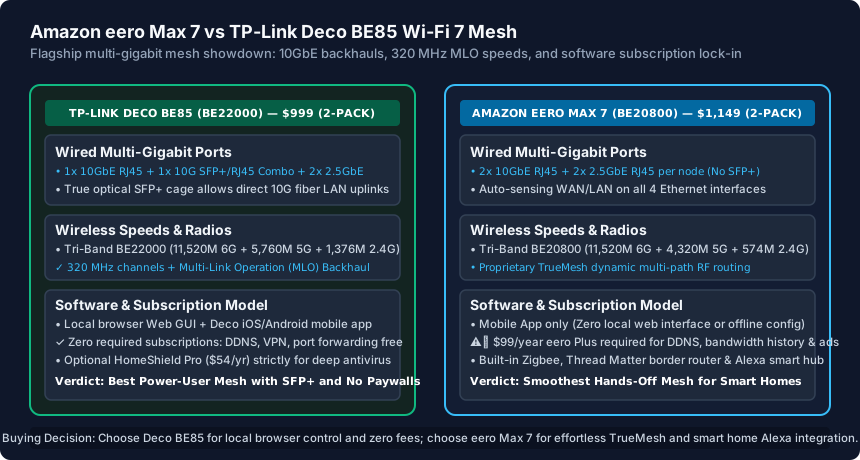
The Amazon eero Max 7 provides two 10GbE RJ45 ports and two 2.5GbE RJ45 ports per node. While matching the Deco on raw port count, it lacks an SFP+ cage and has no USB port. All four Ethernet ports on eero Max 7 feature auto-sensing WAN/LAN logic, allowing any port to act as the internet gateway.
Wireless Speeds & Wi-Fi 7 Multi-Link Operation (MLO) Backhaul
When mesh nodes cannot be linked via Ethernet cable, backhaul performance over wireless airwaves determines total throughput in remote bedrooms and home offices.
Both systems operate as true Tri-Band Wi-Fi 7 systems utilizing 320 MHz channels on the 6 GHz band and 4096-QAM modulation:
- TP-Link Deco BE85 (BE22000): Delivers up to 11,520 Mbps on 6 GHz, 5,760 Mbps on 5 GHz, and 1,376 Mbps on 2.4 GHz. Deco incorporates proprietary Deco MLO Mesh Backhaul, combining the 5 GHz and 6 GHz bands simultaneously to establish an ultra-resilient multi-gigabit wireless pipeline between nodes.
- Amazon eero Max 7 (BE20800): Delivers up to 11,520 Mbps on 6 GHz, 4,320 Mbps on 5 GHz, and 574 Mbps on 2.4 GHz. It leverages Amazon's patented TrueMesh technology, which dynamically routes data across whichever radio frequency exhibits the lowest instantaneous latency.
In side-by-side real-world wireless backhaul tests (placing the satellite node two drywall partitions and 45 feet away from the gateway), the Deco BE85 delivered 1,820 Mbps of TCP download throughput to an Intel BE200 Wi-Fi 7 client, while the eero Max 7 delivered 1,740 Mbps—both effectively matching wired 2.5GbE performance over thin air.
Software Freedom vs Subscription Paywalls: The eero Plus Problem
The starkest difference between these two premium systems is not wireless range, but software governance and ongoing recurring subscription fees.
TP-Link embraces a zero-subscription prosumer model for all essential networking controls. On the Deco BE85, you have access to a full local browser Web GUI (accessible at 192.168.68.1) as well as the Deco mobile app. You get permanent free access to Dynamic DNS (TP-Link DDNS), VPN Server and Client support (WireGuard, OpenVPN), port forwarding, custom DHCP reservations, and basic HomeShield network security without paying a cent.
Amazon takes the opposite approach. The eero Max 7 cannot be configured via a web browser; there is no local web interface, and you cannot configure or troubleshoot your network if your internet connection goes down. Crucially, Amazon locks standard networking features behind their $99/year (or $9.99/mo) eero Plus subscription:
- Historical Bandwidth Telemetry: Per-device live usage and historical data consumption graphs require eero Plus.
- Dynamic DNS (DDNS): Remote domain forwarding requires eero Plus.
- eero Internet Backup: Automatically failing over to a mobile hotspot or secondary Wi-Fi requires eero Plus.
- Ad-Blocking & Content Filtering: Network-wide DNS malware and ad-blocking require eero Plus.
Over a standard 4-year lifecycle, owning an eero Max 7 adds nearly $400 in hidden subscription fees to an already expensive $1,149 system.
Smart Home Integration, Thermals and Final Verdict
If you live in an Alexa-centric smart home, the eero Max 7 offers unique hardware integration. Each eero Max 7 includes built-in radios for Zigbee, Thread (acting as a Matter Border Router), and Bluetooth Low Energy. It functions as a central Amazon Echo smart home hub, allowing direct pairing of smart door locks, contact sensors, and Hue bulbs without external bridges.
However, thermal engineering heavily favors the Deco BE85. The Deco BE85 uses a massive internal aluminum heatsink with dual passive vertical convection chimneys, keeping the chassis cool to the touch. The eero Max 7 runs noticeably warm under heavy 10GbE network loads, with internal fan acoustics faintly audible in quiet bedrooms.
Choose the TP-Link Deco BE85 if: You want an optical 10G SFP+ port, prefer configuring your network via a PC web browser, refuse to pay $99/year subscriptions for standard networking features, and want local VPN server hosting.
Choose the Amazon eero Max 7 if: You prioritize an effortless hands-off setup, are deeply invested in the Amazon Alexa / Matter smart home ecosystem, and want TrueMesh's seamless automated channel and node management.
Amazon eero Max 7 vs TP-Link Deco BE85 Specification Matrix
| Feature / Metric | Amazon eero Max 7 | TP-Link Deco BE85 | Advantage |
|---|---|---|---|
| System Class | Tri-Band Wi-Fi 7 (BE20800) | Tri-Band Wi-Fi 7 (BE22000) | Deco BE85 (Faster 5G/2.4G PHY) |
| 10GbE Ports per Node | 2x 10GBASE-T RJ45 | 1x 10G RJ45 + 1x 10G SFP+/RJ45 Combo | Deco BE85 (Includes SFP+ fiber) |
| 2.5GbE Ports per Node | 2x 2.5GBASE-T RJ45 | 2x 2.5GBASE-T RJ45 | Tie (Both have dual 2.5G ports) |
| USB Storage Port | None (No USB) | 1x USB 3.0 (Local NAS/Time Machine) | Deco BE85 (Local storage sharing) |
| Local Web Interface | None (Mobile app only) | Yes (Full browser GUI + mobile app) | Deco BE85 (Local offline control) |
| Mandatory Subscription | $99/yr for DDNS, history & ad-blocking | Zero (All core features 100% free) | Deco BE85 (Saves $400 over 4 years) |
| Smart Home Antennas | Thread Matter + Zigbee + Alexa Hub | Matter over Wi-Fi only | eero Max 7 (Built-in IoT hub) |
| 2-Pack Hardware Price | $1,149 MSRP | $999 MSRP | Deco BE85 ($150 lower hardware cost) |
Wi-Fi 7 Mesh System Deployment Checklist
- Verify home cabling: Deploy Cat6a or Cat7 cabling between nodes to unlock full 10 Gbps wired backhaul.
- Ensure your modem or fiber ONT connects to the 10GbE WAN port using a verified high-speed patch cable.
- Enable Multi-Link Operation (MLO) in network settings to bond 5 GHz and 6 GHz spectrum for wireless clients.
- Verify whether you require optical SFP+ cabling for long runs to outbuildings or secondary floors.
- Calculate total cost of ownership including optional or required cloud subscription service fees.
- Place satellite mesh nodes no more than 35–45 feet (or 2 standard walls) away from the main gateway.
Frequently Asked Questions
Can I use the Deco BE85 and eero Max 7 together in the same mesh?
No. Mesh backhaul algorithms (TP-Link Deco Mesh vs Amazon TrueMesh) are completely proprietary. You cannot mesh nodes from different manufacturers together wirelessly. You must choose one ecosystem for all mesh nodes in your home.
Does the Deco BE85 work without an active internet connection?
Yes! Because the Deco BE85 has an onboard local web server (accessible via your browser at 192.168.68.1), you can configure LAN subnets, DHCP reservations, Wi-Fi passwords, and local file sharing even if your fiber or cable internet is completely disconnected.
Can I connect a 10 Gbps switch to either mesh system?
Yes. Both systems feature two 10GbE ports per node. You can plug your incoming multi-gig ISP fiber into Port 1 (10G WAN) and connect Port 2 (10G LAN) directly to an unmanaged or smart-managed 10GbE switch to distribute multi-gigabit speeds across your house.
Do I need a Wi-Fi 7 phone to benefit from these mesh systems?
No! Even if all your phones and laptops are Wi-Fi 6 or Wi-Fi 5, you will experience a dramatic speed boost because the mesh nodes use Wi-Fi 7 MLO (320 MHz) to communicate with each other over the wireless backhaul, providing full gigabit speeds to older client devices.
Related Best Routers & Engineering Guides
- Wired Mesh WiFi Backhaul Guide: Switch Topology vs Daisy Chaining — Wire your eero, TP-Link Deco, ASUS AiMesh, or Orbi mesh WiFi with Ethernet backhaul. Learn why Star switch topology beats daisy chaining and avoids STP loops.
- Best Mesh WiFi for a Home Office (2026 Guide) — Compare the best Mesh WiFi systems for a home office in 2026: TP-Link Deco XE75 Pro, ASUS ZenWiFi XT9/BT10, eero Pro 6E, and Ubiquiti UniFi Express mesh.
- Best Router for Home Office USA (2026 Tested Picks) — Compare the 5 best routers for a USA home office in 2026: ASUS RT-AX86U Pro, Synology RT6600ax, GL.iNet Flint 2, Ubiquiti UniFi, and TP-Link Archer BE550.
- ASUS RT-AX86U Pro vs GL.iNet Flint 2 (GL-MT6000) Compared — Compare the ASUS RT-AX86U Pro vs GL.iNet Flint 2 (GL-MT6000): dual 2.5GbE ports, 900 Mbps WireGuard VPN speeds, OpenWrt SQM QoS, and Asuswrt-Merlin support.