
CrowdSec vs Fail2ban on OPNsense & pfSense: Intrusion Defense Guide
CrowdSec is a modern, collaborative intrusion prevention system that analyzes local server logs and shares validated attack telemetry with a global consensus network of over 250,000 nodes, preemptively blocking malicious botnet IPs before they ever reach your firewall. In contrast, Fail2ban is a legacy, single-host log parser that can only react after an attacker has already hit your server multiple times.
- Collaborative vs Isolated: CrowdSec blocks global botnets proactively via crowdsourced IP blocklists; Fail2ban only blocks an IP after it repeatedly fails authentication against your local machine.
- Architecture Separation: CrowdSec decouples log parsing (Security Engine) from firewall enforcement (Remediation Bouncers), allowing one engine to protect multiple OPNsense firewalls, Nginx reverse proxies, and Docker hosts.
- Firewall OS Support: CrowdSec provides an official, actively maintained OPNsense plugin (
os-crowdsec) and FreeBSD bouncer; Fail2ban is unmaintained on BSD-based firewalls. - Remediation Versatility: Fail2ban only supports binary IP drops via iptables/pf; CrowdSec can enforce packet drops, rate limiting, CAPTCHA challenges, and MFA step-ups at the application layer.
The Anatomy of Homelab Scans: Why Isolated Reactive Log Parsing Fails
Anyone who exposes SSH (port 22), HTTPS (port 443), WireGuard, or a reverse proxy to the public internet experiences continuous port scanning, credential stuffing, and vulnerability probing within minutes of acquiring a public IPv4 address. Historically, system administrators deployed Fail2ban on Linux hosts to mitigate these attacks.
Fail2ban functions by monitoring log files (such as /var/log/auth.log or Nginx access logs) via Python regular expressions. When an IP address exceeds a configured failure threshold (e.g., 5 failed SSH login attempts within 10 minutes), Fail2ban triggers a shell command that inserts a temporary block rule into the host's local firewall (such as iptables, nftables, or FreeBSD's pf).
While effective for single standalone servers facing naive dictionary attacks, this isolated model suffers from a catastrophic architectural flaw: it is 100% reactive. An attacker must attack your server directly and fail multiple times before any defensive action occurs. Distributed botnets easily bypass Fail2ban by rotating through thousands of unique IP addresses, issuing only one or two authentication attempts per IP every few hours. Because each IP stays well below your local ban threshold, Fail2ban never triggers, allowing the attack to proceed undetected.
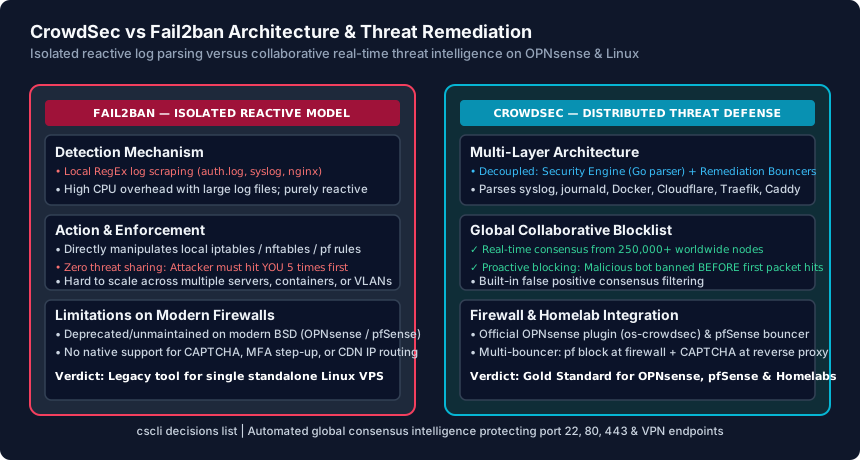
How CrowdSec Works: The Security Engine, Bouncers, and Global Consensus
Written in Go for high throughput and low memory overhead, CrowdSec re-architects host-based intrusion prevention into a modular, cloud-coordinated defense network. CrowdSec separates its functionality into three core components:
- The Security Engine (Local Agent): Reads logs from system journals, log files, Docker container streams, or Syslog inputs. It normalizes events using Grok patterns and evaluates them against YAML-defined behavioral scenarios (such as HTTP path probing, SSH brute-force, or CVE-specific exploitation patterns).
- Remediation Components (Bouncers): Lightweight daemons deployed wherever enforcement should occur. Instead of tying log inspection directly to local firewall tables, the Security Engine exposes a local REST API (LAPI). When an attack is detected, Bouncers query LAPI to apply remediation. You can deploy a Firewall Bouncer at your OPNsense perimeter to drop packets, a Nginx/Traefik Bouncer to serve CAPTCHAs, or a Cloudflare Bouncer to block traffic at the edge.
- The Global Consensus Network: When your local Security Engine detects an attack, it strips all private client data and transmits the attacker's IP and triggering scenario to the CrowdSec Central API. CrowdSec evaluates these signals across more than 250,000 participating worldwide instances. Once an IP is verified as malicious by algorithmic consensus, it is added to the Community Blocklist and pushed down to all subscribers.
This means when an attacker scans a server in Frankfurt or Tokyo, your OPNsense router in Seattle or Chicago receives the ban rule before that botnet IP ever sends a single packet toward your WAN interface.
Deploying CrowdSec on OPNsense: Installation & Firewall Configuration
Unlike pfSense—which requires installing packages via the FreeBSD shell and configuring custom startup scripts—OPNsense provides an official, GUI-managed CrowdSec integration maintained directly in its core plugin repository.
Step 1: Install the CrowdSec Plugin
Log in to your OPNsense web management dashboard (https://192.168.1.1) and navigate to System → Firmware → Plugins. In the search box, search for crowdsec. Click the + button next to os-crowdsec to install both the Go-based Security Engine and the FreeBSD packet filter (pf) firewall bouncer.
Step 2: Enroll with the CrowdSec Console (Optional but Recommended)
To view real-time threat maps, active alerts, and manage multiple homelab nodes from a central dashboard, register a free account at app.crowdsec.net. Generate an enrollment key and register your OPNsense instance via SSH console or GUI:
# Enroll your OPNsense firewall with the CrowdSec Console
sudo cscli console enroll [YOUR_CONSOLE_ENROLLMENT_KEY]
sudo service crowdsec restart
Step 3: Verify Active Community Blocklists and Bouncers
Open an SSH session to OPNsense and run the following CLI commands to verify that the firewall bouncer is actively feeding IP tables into pf:
# Check that the local firewall bouncer is registered and healthy
cscli bouncers list

# View the community blocklist decisions currently enforced in your firewall
cscli decisions list

# View active log acquisition streams (Syslog, SSH, Web GUI)
cscli metrics
CrowdSec automatically populates a persistent pf table named crowdsec_blacklists in the OPNsense packet filter. Any incoming connection from an IP address on that list is dropped instantly with zero CPU overhead, protecting your open WireGuard ports, reverse proxy endpoints, and Web GUI.
CrowdSec vs Fail2ban: Feature Comparison & Migration Verdict
When selecting the defensive layer for your homelab, small business perimeter, or virtual private servers, the technical differences between these two platforms are substantial:
- Memory & CPU Efficiency: Fail2ban's Python regex engine consumes significant CPU cycles when processing high-volume HTTP logs (often spiking to 100% core usage during DDoS attacks). CrowdSec's compiled Go engine parses logs at tens of thousands of lines per second with negligible CPU usage.
- Container & Cloud Native Environments: Fail2ban was designed for bare-metal Linux servers and struggles inside Docker, Kubernetes, or containerized reverse proxies where client IPs are masked behind bridge networks. CrowdSec parses forwarded proxy headers (
X-Forwarded-For) natively and connects directly to Docker socket logs. - Multi-Server Orchestration: With Fail2ban, each server is an isolated silo; banning an IP on your web server does not protect your mail server or SSH bastion. With CrowdSec, a single centralized LAPI instance shares ban decisions instantly across your entire fleet of physical servers, cloud VPS instances, and perimeter routers.
The Final Verdict: If you are managing an isolated Linux VPS with a single exposed SSH port, Fail2ban remains functional. However, for any multi-service homelab, OPNsense/pfSense firewall, or public-facing reverse proxy, CrowdSec is vastly superior in detection accuracy, resource utilization, and proactive community-backed threat mitigation.
CrowdSec vs Fail2ban Technical Comparison Matrix
| Architecture & Security Feature | CrowdSec (Modern Defense) | Fail2ban (Legacy Log Parser) | Architectural Advantage |
|---|---|---|---|
| Underlying Language | Compiled Go (High-performance) | Interpreted Python (Regex-based) | CrowdSec (5-10x lower CPU utilization) |
| Threat Intelligence Model | Collaborative global consensus (250k+ nodes) | Isolated single-host reactive only | CrowdSec (Proactive block before first scan) |
| OPNsense & pfSense Support | Official OPNsense plugin (os-crowdsec) | Deprecated; manual unmaintained scripts | CrowdSec (Native GUI plugin & pf bouncer) |
| Supported Remediation Types | Firewall drop, CAPTCHA challenge, MFA step-up | Firewall drop (iptables/pf) only | CrowdSec (Application-layer flexibility) |
| Reverse Proxy & Docker Support | Native support for Traefik, Caddy, Nginx, NPM | Complex socket mounts and IP parsing hacks | CrowdSec (Understands X-Forwarded-For) |
| Centralized Web Console | Yes (app.crowdsec.net multi-node dashboard) | None (Requires third-party log aggregators) | CrowdSec (Centralized homelab fleet view) |
| Licensing & Cost | 100% Free Open-Source (Community Edition) | 100% Free Open-Source (GPLv2) | Tie (Both free for homelab & self-hosters) |
CrowdSec Firewall Hardening Checklist
- Install the official os-crowdsec plugin from the OPNsense firmware manager.
- Verify the crowdsec_firewall bouncer is registered via 'cscli bouncers list'.
- Confirm log acquisition paths in /usr/local/etc/crowdsec/acquis.yaml cover SSH and Web GUI logs.
- Ensure your reverse proxy forwards true client IPs via X-Forwarded-For headers to prevent banning your own proxy.
- Register your firewall node with the CrowdSec SaaS console to receive real-time alerts.
- Test proactive defense by checking that the community blocklist contains active malicious IPs via 'cscli decisions list'.
Frequently Asked Questions
Will CrowdSec accidentally ban legitimate search engine crawlers like Googlebot?
No. CrowdSec includes built-in scenario whitelists for verified search engine bots (Googlebot, Bingbot), major cloud provider health checkers, and Cloudflare reverse proxy IPs. Furthermore, the global consensus algorithm requires multi-node validation before an IP is added to the global blocklist.
Can I run CrowdSec alongside pfBlockerNG or OPNsense GeoIP blocking?
Yes. CrowdSec operates harmoniously with pfBlockerNG and OPNsense GeoIP alias tables. GeoIP blocks entire countries at Layer 3, while CrowdSec dynamically updates surgical Layer 3/4 and Layer 7 IP blocklists based on active behavioral attack telemetry.
Does CrowdSec send private logs or packet contents to the cloud?
No. CrowdSec operates with strict privacy guarantees. Your log files and server payload contents never leave your local machine. The local Security Engine only transmits three metadata points to the consensus API: the attacking IP address, the triggered attack scenario name (e.g. 'crowdsecurity/ssh-bf'), and the timestamp.
What happens if my OPNsense router loses internet connectivity to CrowdSec servers?
The local Security Engine continues operating independently. It parses local logs, detects intrusions, and commands the local firewall bouncer to ban attackers locally just like Fail2ban. Once internet connectivity is restored, it syncs the latest global community blocklist updates.
Related Home Network Security & Engineering Guides
- Router Firewall Settings Explained (SPI, NAT & Rules) — Master your router firewall settings. Configure Stateful Packet Inspection (SPI), disable broken SIP ALG for VoIP, block WAN pings, and secure IPv6 rules.
- How to Secure Smart Home & IoT Devices on Your Network — Isolate untrusted smart TVs, cameras, and plugs on a dedicated IoT WiFi VLAN. Enable mDNS UDP 5353 reflection for AirPlay and block risky WAN callbacks.
- UPS Battery Backup for Router, Modem & ONT Guide — Keep your fiber ONT, cable modem, WiFi router, and PoE switch online during blackouts. Calculate VA runtime, compare sine wave UPS units, and test failover.
- Pi-hole & AdGuard Home Router DNS Setup Guide — Configure your router for Pi-hole or AdGuard Home using LAN DHCP DNS, Conditional Forwarding, and Port 53 firewall redirects to block hardcoded Smart TV DNS.